
Editor’s note: This comparison guide was last updated on 24 February 2022 to reflect changes introduced with Angular v13 and Blazor updates from .NET 6.
Angular, formerly known as AngularJS until 2016, was created to allow frontend developers to interact with both frontend and backend at the same time. This was very helpful at the time, especially because the backend was usually built with other languages, like C# or Java, meaning it was generally maintained by a different set of developers.
With the advent of SPAs, Angular became even stronger, and new competing frameworks arose, like Microsoft’s Blazor. Blazor is a web framework that allows C# to be run along with HTML and CSS, creating components and generating SPAs. It was written under the .NET platform, bringing all the power of Microsoft’s framework, both in the client and the server.
In this article, we’ll compare Angular and Blazor. We’ll analyze the community strengths of each framework, as well as their PWA/SPA support, async nature, and architecture.
Table of contents
Because Angular is JavaScript based, there are a lot of resources to work with. Let’s analyze some of them in a bit more detail.
Angular has been around for a long time compared to Blazor. It is a production-ready framework with full support for MVC/MVVM applications and it is currently used by many large companies. Blazor, on the other hand, is very promising but is still evolving.
When it comes to tooling, Angular is also ahead. Angular has VS Code support for development that Blazor only implemented more recently.
Regarding the libraries, Angular Material, for example, is one of the most famous, especially because it embraced Google’s Material Design, a design language very common in Google products. Apart from that, other major design libraries can be easily set up, such as Bootstrap, through the NG Bootstrap library, or PrimeNG.
Blazor has an equivalent version of its own Material Design library, but it’ll take time to achieve such maturity levels. Angular also offers several options when it comes to Angular-supported tooling, including IDEs, UI components, and data libraries.
Angular is extremely popular. At the time of this writing, its GitHub repository counts 79.8k stars and 21k forks. It is definitely an important and beloved framework in the frontend community.
It’s harder to analyze Blazor’s popularity, The project was moved to the ASP.NET Core repo after officially becoming part of the ASP.NET project. Previously, Blazor had 9.3k stars and 683 forks. It would not be appropriate to consider the ASP.NET Core stats, as they involve a lot of other factors beyond Blazor itself.
Another good comparison is Stack Overflow. At the time of this writing, Angular has accumulated a total of 272.6k questions while Blazor only has 7.9k questions.
Comparing both techs in Google Trends, the gap becomes even more obvious:
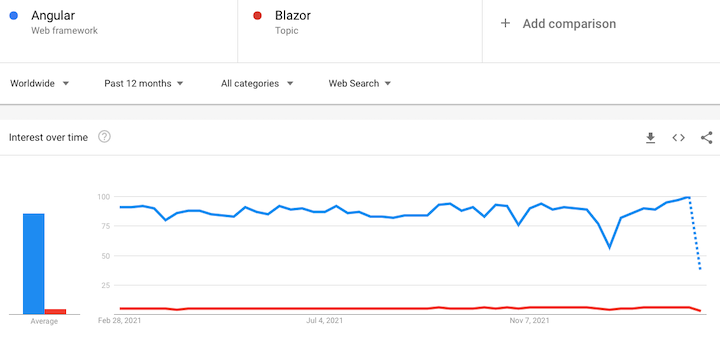
With such community strength and longevity, Angular was able to grow a larger and more invested community compared to Blazor. You’ll find more content, courses, books, blogs, and materials about Angular than you’ll find for Blazor.
Google is a big fan of Progressive Web Apps (PWAs), and therefore so is Angular. Its usage can be added to Angular apps by simply running:
ng add @angular/pwa
You can guess that for other Google projects, like the famous Workbox, for example.
For a long time, Blazor was categorized as a framework not capable of doing PWA. They’ve recently announced that they do support PWA, however, as with many things with Blazor, that’s a work in progress. Besides being stable, some developers complain about the initial download app size being too large, whereas small bundle sizes are considered crucial for SPAs.
However, the community remains optimistic about the PWA support. It’s not ideal yet, but it’s constantly evolving.
The view engine has been completely removed from Angular v13. The framework now uses a rendering engine called Ivy. As a result, Angular now allows for faster compilation and higher productivity.
Another improvement to Angular v13 is that persistent build-cache is enabled by default for all new projects, resulting in an improved build speed.
Angular, like many other web frameworks and libraries, allows the usage of scoped styles, in which you can apply a CSS style specifically for a related component. Here’s an example:
@Component({
  selector: 'app-root',
  template: `

Title H1


  `,
  styles: ['h1 { font-weight: normal; color: red; text-transform: uppercase; }']
})
export class AppComponent {
  ...
}
This will result in a view like this:

That’s a somewhat controversial feature because it is not supported by many browser versions. However, the functionality is interesting. Blazor lacks it, although some people are already trying out alternatives. It’s up to you to decide if scoped styles are important enough for your projects.
Angular has proved its value throughout time. Here’s a summary of its many advantages:
N.B., with the release of Angular v13, support for Internet Explorer 11 has been fully removed
Blazor is a good option for some specific reasons that we’ll explore in more detail. First, Blazor is C# based, so if you like object-oriented languages (or any of the C# features), you’ll feel right at home. C# is strongly typed and has tons of auxiliary libraries to enhance your coding.
In the early years of interactive web development, JavaScript was the only programming language that support building applications that run on both client and server. Now, C# is used to build applications that run on both client and server, allowing you to share and reuse code and libraries. Blazor enables you to create interactive web UIs with C#, HTML, and CSS without having to use JavaScript. Now, C# developers don’t have to learn JavaScript in order to build client-side applications. A common approach for running any non-JavaScript web application in the browser is to transpile the language code to JavaScript. But, with Blazor you can build applications that run directly in the browser without code transpilation.
Using WebAssembly, Blazor can run client-side C# code directly in the browser.
Your client logic can also be run on the server by Blazor. Here, SignalR, a real-time messaging framework, is used to transmit client UI events to the server. The appropriate UI updates are communicated to the client and merged into the DOM once the execution is completed.
With Blazor, JavaScript APIs and libraries can be used in C# codebase. While creating your logic in C#, you can also use JavaScript libraries for your client-side UI. All these happen without depending on third-party libraries.
This feature is well-known by many frontend devs, especially with the Next.js framework. But Blazor prefers to call it “prerendering”. Server-side rendering consists of compiling all the app’s components and elements on the server side and, then, generating static HTML/assets to send to the client.
The main benefit is improved overall performance. Prerendered pages are way faster than ordinary ones, so this feature can also deliver a boost in SEO results. There is, however, a whole concept behind its use which I’d very much recommend you study before adopting this feature.
Blazor makes use of a WebSocket connection to flow data back and forth. Because of this, its initial page size when downloaded is reportedly smaller than in Angular. Perhaps, the difference is due to the verbosity and boilerplate codes Angular brings within its downloaded bundles.
Other than that, when in an HTTP/2 server connection, tests via signalR (an ASP.NET library that adds real-time web functionality to your applications) have proved that the latency is very low as well as the message framing due to not having to establish connections.
In other words, the ability of an application to send messages from a server to the clients in real time is a great way to test if the language (alongside the protocol being used) is really fast. In your client, then, you can measure the timing between the requests and responses. The same WebSocket could also be used to send data via push to your Blazor components in a very fast manner.
Blazor is very fast in terms of build and debugging. Because it takes advantage of Visual Studio and the whole experience accumulated among its tools and plugins, the development and debugging can be really fast.
Blazor also brings the noted live reloading feature during the development that you can set up in no time:
// Add NuGet package:
dotnet add package RazorComponentsPreview

// Add to the StartUp class:
services.AddRazorComponentsRuntimeCompilation();
app.UseRazorComponentsRuntimeCompilation();
This feature depends on the compilation and build time. The performance comparison of the same functionality between Angular and Blazor reveals the latter to be up to 20 times faster, including builds running in CI/CD pipelines. That’s a lot.
In terms of coding, Angular is known for its boilerplates. With Blazor, you’re already in the back-end, which means that you can write methods on services that can be directly called from the upper layers, rather than going through a whole API structure call as you’d have to do in Angular.
While Angular makes use of the inbuilt async nature inherited from JavaScript, it also supports the powerful RxJS to handle the async operations. C# has evolved itself to support it out of the box in a simple and clean way. Sometimes, you can even feel that some implementations are very similar between both techs.
For example, imagine that two client apps made with Angular and Blazor, respectively, consume from the same API endpoint.
Due to their async natures, you would have the following code for both calls:
//Angular
async getUserData() {
   return await this.httpClient.get("api/users").toPromise();
}
// Blazor
public async Task GetUserData()
{
   return await Http.GetFromJsonAsync("api/users");
}
Can you spot the similarities? The async/await operations allow us to wait for a single asynchronous operation to complete. This same operation can only complete one time, and will always have a single result. And, yes, they equally apply to Blazor and Angular.
While Blazor is still a newer framework, it has proved that it is willing to keep improving and hearing from the community. Here’s a summary of Blazor’s advantages:
The following table summarizes the benefits of Blazor and Angular that we’ve reviewed in this article:
| Angular | Blazor |
| JavaScript based | C# based |
| Fully support SPA and PWA | Fully support SPA and PWA |
| > 79.8k stars on GitHub | > 9.3k stars on GitHub |
| Production ready | Production ready |
| Mature tooling and design library | The common tools (like IDEs) are working to add support
Design library in progress |
| Open source | |
| Supports async features | |
| Supports scoped styles | No support yet |
| Download size: ~111K | Download size: ~2MB-2.4MB |
| CI/CD time: 10-20 times slower | CI/CD: 10-20 times faster |
Blazor and Angular are both robust, open source frameworks that try to solve common problems that the frontend development community faces.
When compared to Blazor, Angular stands out in some important ways. For example, frontend developers who have never been in touch with backend languages or .NET may find it tricky to move to Blazor. It would require learning C#, .NET, and Razor. If you’re hiring people to work on frontend projects, chances are that you’ll find it difficult to find good Blazor developers, whereas there are a large number of Angular devs available out there.
Blazor is a powerful framework that, in comparison to Angular, is developed with a lot of flexibility and compatibility in mind.
Besides these differences, Blazor and Angular also share some significant similarities. The routing systems of both frameworks are very similar, although Angular’s is a bit more complex and requires more boilerplate code to work. Both Angular and Blazor have great libraries to deal with HTTP calls (perhaps a good inheritance from their creators), and great template systems (some parts of them very similar). What about you? How has your experience been with these two frameworks?
Debugging Angular applications can be difficult, especially when users experience issues that are difficult to reproduce. If you’re interested in monitoring and tracking Angular state and actions for all of your users in production, try LogRocket.
LogRocket lets you replay user sessions, eliminating guesswork by showing exactly what users experienced. It captures console logs, errors, network requests, and pixel-perfect DOM recordings—compatible with all frameworks.
With Galileo AI, you can instantly identify and explain user struggles with automated monitoring of your entire product experience.
The LogRocket NgRx plugin logs Angular state and actions to the LogRocket console, giving you context around what led to an error, and what state the application was in when an issue occurred.
Modernize how you debug your Angular apps — start monitoring for free.

Vibe coding makes building apps faster, but speed without engineering can create serious failures. Here are five real-world examples and practical checks to help you ship AI-generated code safely.

Compare React ViewTransition and Motion across four animation patterns. The native build saved ~38.6kB of gzipped JS, but required 179 more lines of CSS.

Learn how to run Cline locally with Ollama to build a secure, private AI coding agent that keeps your proprietary code off cloud servers.

Compare TanStack Charts, Recharts, and Chart.js by building the same React dashboard three times. See how each library’s mental model affects your code.
Would you be interested in joining LogRocket's developer community?
Join LogRocket’s Content Advisory Board. You’ll help inform the type of content we create and get access to exclusive meetups, social accreditation, and swag.
Sign up now


 Learn more →




