UX research is no longer confined to dedicated research teams. In 2026, designers, product managers, and even marketers are increasingly responsible for gathering and applying user insights — all while product cycles continue to accelerate. At the same time, AI is transforming how teams synthesize interviews, analyze data, and scale ResearchOps.

These shifts point to three major trends reshaping UX research today: broader research democratization, growing delivery pressure, and AI-assisted workflows.
Just over a year ago, Maze published The Future of User Research Report 2025, highlighting three user research trends:
Before we even look at all of this in detail, one thing is abundantly clear, and it’s that organizations need to carry out research operations (“ResearchOps” or just “ReOps”) quickly and are using AI to do so.
This aligns with the broader industry shifts towards democratizing research so that all teams can be empowered to make data-driven decisions, as well as using AI to increase efficiency.
But the real questions are: who, what, why, and is it working? Let’s take a look.
While the Maze report doesn’t explicitly state that the volume of research has increased, it’s heavily alluded to. What’s clearer, and frankly more important anyway, is that more teams are making more decisions based on research, which indicates two things. Firstly, it indicates that conducting research is easier now than ever before (probably due to the capabilities of AI, which we’ll discuss later). Secondly, it indicates that research democratization is proving beneficial in a number of scenarios:
Lower development costs, improved brand perception, fewer support requests, higher sales win rates, and faster time-to-market are also cited.
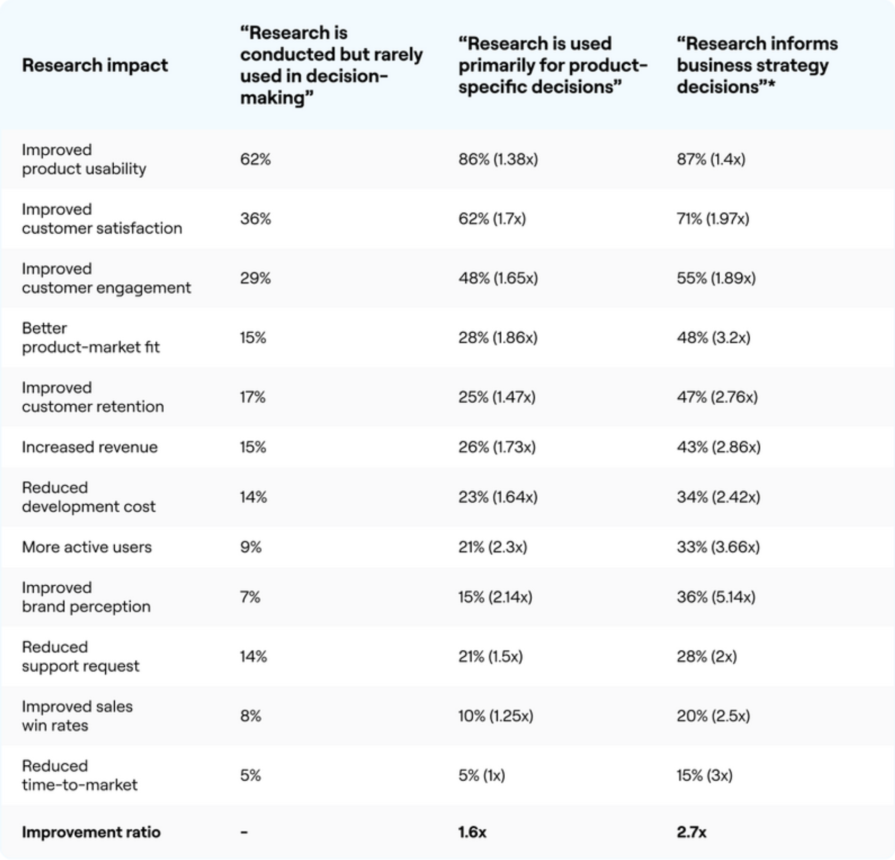
As you can see, research boosts key performance indicators (KPIs) across all functions. Critically, research doesn’t miss the big picture either. For example, it results in better product-market fit, positioning businesses to solve, scale, and profit from high-demand problems, and also increases revenue, which is arguably the end-goal.
However, it’s worth noting that these statistics are being unfairly weighted down by increasingly antiquated approaches to research. When research is used to inform the wider business strategy, organizations see 2.7x better outcomes. Using revenue as an example, a higher percentage of organizations (43%, up from the aforementioned average of 32%) reported more revenue when research was used with the overall business strategy in mind. Adversely, only 26% reported more revenue when used to make product decisions only, and only 15% reported more revenue when research was conducted but rarely used to make decisions.
The full breakdown (shown above) is very telling, but to summarize, when more teams use research to make decisions, and even more so when that research is used to advance the business strategy, the better the business impact.
“The more research is integrated, the greater its business impact” is how Maze describes this trend — but it’s not the trend, it’s the takeaway.
To create business impact, teams need business goals. For example, if no small chunk of change is being lost to customer churn, a sensible business goal is to increase customer retention. But which team is responsible for customer retention? The design team? Sure, if usability is the problem. The development team? Perhaps, if users are tired of bugs. The marketing team? Yes, maybe customers just aren’t seeing the full potential of the product. Therefore, all teams must have access to the data and resources needed to identify business bottlenecks and benchmark improvements. This doesn’t change the roles (for example, designers will still be responsible for usability), but it’ll change how they prioritize opportunities, they’ll have a better understanding of how the means justify the ends, and they’ll ultimately be empowered to create business impact.
Even when enterprise organizations have dedicated UX researchers, business impact is higher (for instance, revenue is 8% higher) when those UX researchers offer dedicated support to non-researchers. Either way, non-researchers cite support in the following ways:
Overall, designers are now conducting more research than dedicated UX researchers, and product managers aren’t too far behind either. Other functions are also up, albeit by a smaller amount:
How much your organization should loosen the reins should depend on the speed in which it wants to move (this is extremely important for the next trend). More empowerment means fewer check-ins and faster results, whereas moderate empowerment means more meetings or having a cross-functional team, either to tackle problems together or simply for streamlined coordination.
A fantastic way to get the ball rolling is to coordinate a cross-functional sprint, connecting all teams to decide on and work towards a shared business goal, working together and independently as needed, while sharing any research data and resources.
In any case, research should be democratized. This means to empower everybody to access, conduct, apply, and share research. This works best when teams are provided with the aforementioned support, but the following benefits should be felt either way:
Product teams mostly conduct research for problem discovery (75%) and problem validation (68%), indicating a focus on learning what to build. However, 63% of product teams say that the number one problem is lack of time and bandwidth. In addition, this problem contributes to other problems:
From experience, these issues aren’t difficult to overcome given an unlimited amount of time to tackle them carefully. However, the need to build quickly as a result of fierce competition across almost all industries, the rapid pace of technological innovation (we’ll get to the AI stuff in a moment), and other reasons mentioned in the report, can result in research projects taking small hits from all angles. Bryanne Peterson from Broadcom said that pressure to shorten research times only led to accumulated research debt, causing delays, which very much aligns with what experts have been saying for years.
This puts businesses between a rock and hard place, especially as demand for user research increased by 55% just this year alone. I could probably link to hundreds of resources to help you conduct research, and they’d of course be extremely useful if not absolutely imperative, but competition and technological advancements are currently outpacing these techniques. There needs to be something more.
We’ve already discussed democratizing research, the possibility of cross-functional teams, and engaging in continuous discovery cycles would likely lead to faster results as well, but there’s another technique (in fact, another trend entirely) that’s powering a change in the way that we conduct research in 2026 and beyond. I am, of course, talking about AI.
AI-powered research increased by 32% across the board. Teams used it for:
I intentionally left out “Generating research questions (54%)” and “Getting research inspiration (38%)” as these require human critical thinking skills that AI simply doesn’t have (yet?).
As you can see, AI accelerates some very time-consuming aspects of research, helping businesses overcome those time and bandwidth constraints. In fact, these are the benefits as cited by respondents:
AI-powered research isn’t flawless, though. Respondents cited the following problems:
As it stands, AI-powered research is a mixed bag. However, I’d wager that it’s overall better than fully manual research, particularly because of the improvements to team efficiency and faster turnaround, which, as we’ve already learned, are huge concerns. In addition, AI will surely improve over time, and there are some guardrails that we can put in place that even the report provides some commentary on:
While you don’t need to review everything manually (that would defeat the purpose of using AI), reviewing AI-generated output should be a common part of the process, even if it’s just a quick scan to see if anything feels off. In any case, you’ll mostly want to use it for tasks that are low-risk and time-consuming. As stated in the report, “AI helps to make the process go faster, but does not replace the process.”
In addition, you should review and refine your own prompts, because if your instructions or the data that you feed it are unclear, the output will be just as bad as the input.
It goes without saying that AI should never have access to information that’s personally identifiable, confidential, or sensitive. A human review should circumvent this, but the risk is high enough and the consequences are severe enough that it warrants a special mention.
It pays to be mindful of what triggers bad output. Look for recurring problems with the output and see if there are recurring themes with the input that might be causing them. For example, you can avoid biased framing/results by telling the AI what to do rather than disclosing what you want. That being said, don’t be afraid to articulate positive and negative feedback, even if it sounds silly or demanding. Yes, AI can talk like a human, but it’s not. Train it by being clear and direct.
When necessary, provide it with relevant resources such as your user personas and design systems along with any relevant context such as design system documentation, and make sure that you constantly review what the AI “remembers” about you, your research projects, and your organization.
While not specifically about research, the following articles provide excellent advice on how to get AI to behave, and insight into why it sometimes doesn’t:
AI-powered research tools circumvent many of these issues. When applicable, the instructions, questions, and any other parameters that you set act as guardrails. The setup doesn’t give you many opportunities to accidentally reveal any biases, and in fact a rock-solid, data-informed prompt is generated for you behind the scenes. The same applies to the output, making it easy to extract AI-generated insights.
More qualitative research methods such as user interviews have fewer inherent guardrails, not to mention that AI-transcription and AI-translation widens the margin of error, if used.
But in any case, AI-powered research tools are designed to speed up the research process even more without sacrificing quality. This awards you more time for human review.
In addition, privacy features provide another layer of security. For example, if a prototype contains the data of a real person, or if a real person discloses sensitive information during a user interview, AI-powered research tools are designed to redact that information.
These are the best AI-powered user research tools on the market today, ordered by rating aggregated from various handpicked sources (yes, I used AI to aggregate and synthesize the data in just a few seconds!):
That’s a lot to digest, and like how product teams just want to know what to build quickly, you probably want to walk away right now with a clear plan in mind to improve ResearchOps in your organization. Well, here are the takeaways:
For a better understanding, I recommend reading The State of Research Operations by User Interviews. I didn’t really like the presentation of this one, but if you’re willing to read through it steadily, you’ll see that it largely aligns with the Maze report, and you’ll gain more confidence in the approach to ReOps discussed here today.
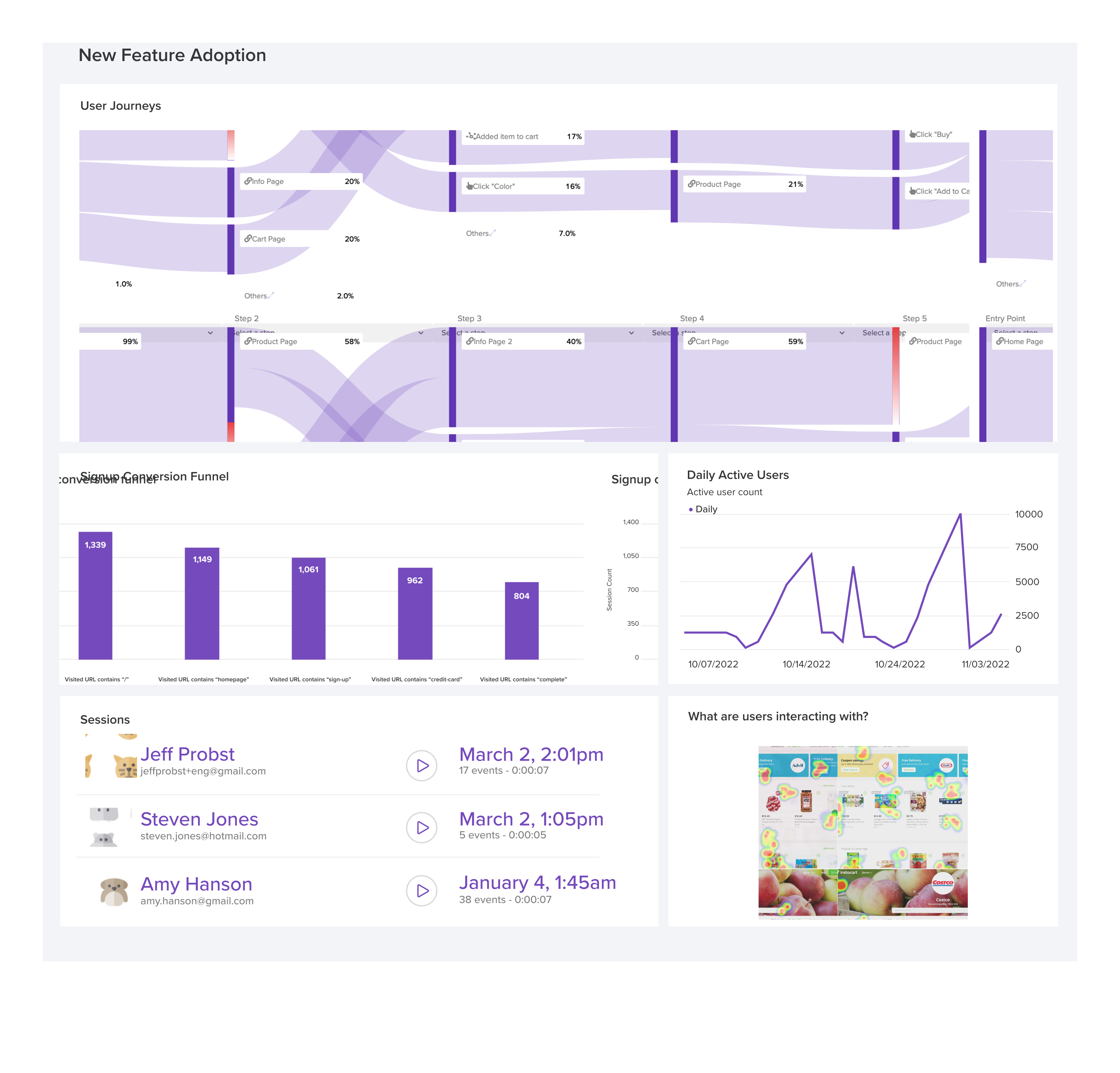
LogRocket's Galileo AI watches sessions and understands user feedback for you, automating the most time-intensive parts of your job and giving you more time to focus on great design.
See how design choices, interactions, and issues affect your users — get a demo of LogRocket today.
AI tools can generate beautiful UI concepts in minutes, but most teams struggle to integrate those outputs into real design systems. This guide explores why AI drifts toward generic patterns and how to build governed workflows that keep speed without sacrificing brand consistency.
Adaptive interfaces personalize experiences using behavioral signals and machine learning. But when personalization becomes autonomous, systems can reinforce patterns, limit discovery, and shape user behavior in ways designers didn’t intend.

Security requirements shouldn’t come at the cost of usability. This guide outlines 10 practical heuristics to design 2FA flows that protect users while minimizing friction, confusion, and recovery failures.

2FA failures shouldn’t mean permanent lockout. This guide breaks down recovery methods, failure handling, progressive disclosure, and UX strategies to balance security with accessibility.


 Learn more →