Design thinking workshops are an essential part of any product design initiative. They help designers speed up their work, focus on the right problems, and align easily with key stakeholders.
As a professional in the field, you are likely to be leading design thinking workshops regularly, even if they are referred to by different names. Your role is crucial, as UX design itself is heavily based on design thinking principles.
In this blog, I look deeper into how to run an effective design thinking workshop. I’ll talk about it all — what design thinking is, how you can run design thinking workshops effectively, design thinking workshop activities and exercises, who you should invite, how long it should be, and a lot more.
Editor’s note: This article was substantially updated in September 2026 to reflect how design thinking workshops are run across in-person, remote, and hybrid teams. The update also adds guidance on using AI for workshop preparation, synthesis, clustering, and ideation, while emphasizing that AI should support participant discussion rather than replace it or introduce unvalidated “research findings.”
Most UX design principles and processes come from the basics of design thinking.
Design thinking is often described through five stages of solving complex and ambiguous problems:
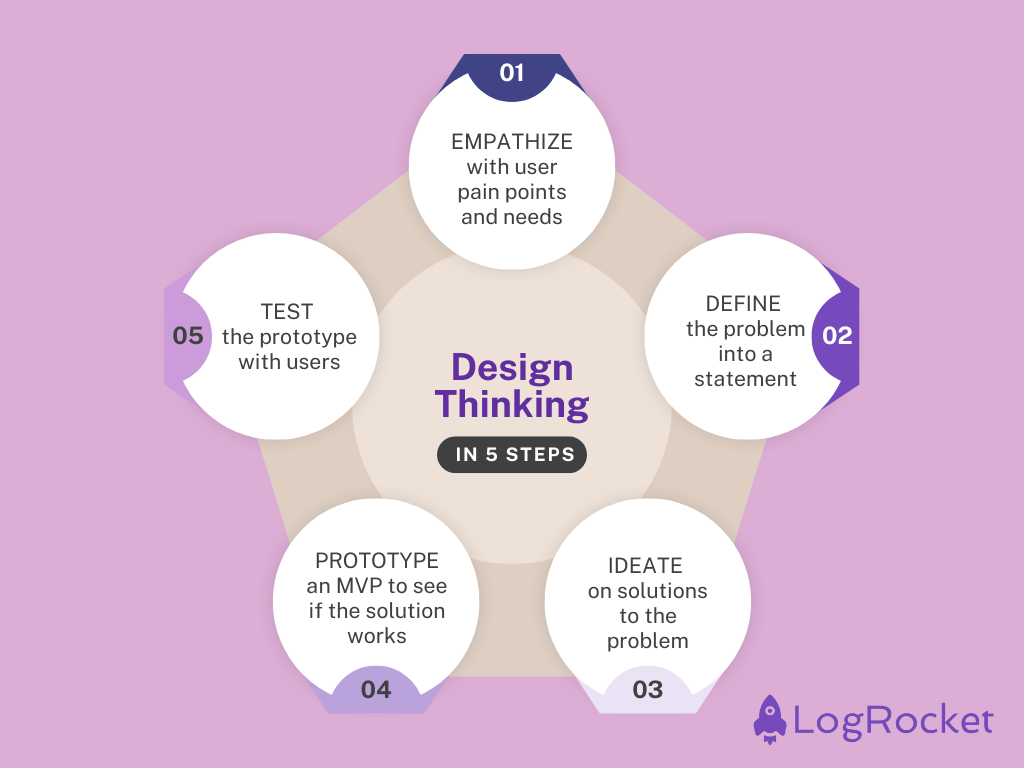
Although they’re usually presented in sequence, these stages aren’t strictly linear. Teams often move backward and forward between them as they learn more.
A design thinking workshop is a way of going through the design thinking process in either one meeting or a series of short meetings.
The entire design thinking process can take weeks if not months. But, a design thinking workshop aims to go through the basics and essentials quickly.
In the spirit of Agile, it’s usually beneficial to run a few smaller iterations of the design thinking process rather than go through a lengthy waterfall approach — design thinking workshops help achieve exactly that.
A design thinking workshop doesn’t require everyone to be standing around the same whiteboard. The same activities can happen in person, remotely, or with a mix of both.
What changes is the facilitation.
For a remote workshop, give participants access to the tools and materials beforehand so you don’t spend the session teaching people how to use the board. It can also help to move background reading and individual thinking outside the meeting, leaving the synchronous time for discussion, collaboration, and decisions.
Hybrid workshops need even more intentional planning. If half the team is moving sticky notes around a physical wall while everyone else watches through a video call, you haven’t really created a hybrid workshop — you’ve created an in-person workshop with an audience.
I prefer giving everyone the same digital workspace, even when some participants are sitting in the same room. That way, everyone can contribute to the same activities, see the same information, and participate in voting or prioritization without location determining how much influence they have.
For larger remote or hybrid workshops, a second facilitator can also help. One person can lead the activity while the other watches the chat, handles technical issues, tracks time, and makes sure remote participants aren’t getting lost in the room.
Unsurprisingly, the structure of a design thinking workshop doesn’t differ much from the design thinking process itself. It usually consists of five main parts:
The first step to running a design thinking workshop is to ensure everyone has access to the same information and insights. Different people in the group will bring different perspectives, and the design thinking workshop is the most effective when everyone sees the same picture.
If you don’t have too many insights yet, dedicate some time before the workshops to dig deeper into qualitative and quantitative data to find them.
Optimize the workshop time by aligning on the insights beforehand. But, there will inevitably be participants who arrive at the workshop unprepared, so plan accordingly.
This becomes even more useful for remote and hybrid workshops. Share the essential research, context, and workshop board ahead of time, and be explicit about what participants are expected to review before the session. You can also collect initial reactions or questions asynchronously rather than spending the first hour presenting information everyone could have read beforehand.
Just don’t assume pre-work replaces alignment altogether. Give people a short opportunity at the beginning of the workshop to raise questions, challenge the evidence, and make sure everyone is actually working from the same understanding.
Now that all known insights are easily available, it’s time to define a shared problem statement. You’ll likely find more than one problem to solve, but the goal is to find the most important or urgent one. Other issues can be addressed in follow-up workshops.
Without a single well-defined problem, the group will likely pull into different directions during the next steps, so spend as much time as needed on this step.
With a clear problem to solve, it’s time to ideate potential solutions.
You also don’t have to choose between synchronous and asynchronous ideation.
For remote and distributed teams especially, I like giving people some time to generate ideas independently before bringing everyone together. It gives participants space to think without immediately anchoring on the loudest or earliest ideas in the room.
Then use the workshop itself for what synchronous collaboration does best: sharing those ideas, building on them, challenging them, combining them, and identifying promising directions.
I recommend conducting a few ideation cycles. If you have 30 minutes, don’t spend 20 ideating and 10 sharing solutions. Instead, do three quicker cycles with, say, seven minutes for ideation and three for sharing. The extra sense of urgency will energize people, and the frequent sharing of ideas will keep the inspiration flowing.
Now, the tricky part.
The most common approach to ideating on solutions and picking the best is to rank all solutions with some framework, such as ICE or impact matrix, and focus on the most valuable one.
Here’s what I prefer doing — I prioritize options based on how much I can learn from testing them. Not only does the extra learning make the next iterations better, but it also fuels better learning about users, which will help with all other initiatives.
If you’re not pressured for quick results, prioritize learning over short-term impact. It will pay off in the long run.
In theory, the last step of the design thinking workshop should be to deliver a working prototype, but I always skip this phase.
There are a few reasons for this:
If you really want to work on prototyping with the whole group, here are a few options.
AI can remove quite a bit of administrative work from a workshop, but I wouldn’t treat it as another participant.
Before a workshop, you might use AI to turn your objectives into a draft agenda, suggest exercises, reorganize background material, or prepare instructions for activities.
During and after the workshop, it can be even more useful for synthesis. Many collaborative whiteboards can now cluster sticky notes, summarize large groups of ideas, identify recurring themes, and turn workshop outputs into a first draft of a recap.
AI can also support ideation, but I prefer bringing it in after people have had a chance to think independently. If the AI generates ten ideas before anyone else speaks, those suggestions can easily become the boundaries of the discussion. Used later, it can instead help challenge the group to explore alternatives or uncover directions they haven’t considered.
The important distinction is that AI can organize what your participants know and generate new possibilities. It cannot manufacture evidence.
If five participants contribute twenty sticky notes and an AI-generated summary introduces a supposed user need that wasn’t in any of them, that isn’t a new research finding. Similarly, an AI-generated cluster is only one interpretation of the material. The facilitator and participants should still review whether the grouping actually makes sense.
I’d keep AI-generated contributions clearly distinguishable from participant input and treat summaries, clusters, and themes as drafts until the group has reviewed them.
The goal is to use AI to spend less workshop time sorting sticky notes and cleaning up boards — not less time discussing, challenging, and making sense of ideas together.
Inviting participants to a design thinking workshop comes with a constant tradeoff. The more people you invite, the more diverse insights and ideas you’ll get, but the less time-efficient and energized the meeting will become.
Over the years, I’ve found that the sweet spot is usually between five and eight people, with up to twelve if the problem is very complex and requires multiple perspectives.
It’s a good practice to have at least one representative from the customer support, marketing, product, design, sales, and tech teams. This mix ensures that all bases are covered and the group benefits from various insights.
For remote and hybrid workshops, think about participation as well as representation. Someone joining individually through a laptop can have a very different experience from six people sitting together in a conference room.
Design activities so every participant has an equivalent way to contribute. A shared digital board, individual ideation time, structured turn-taking, anonymous voting, or smaller breakout groups can help prevent proximity or confidence from determining whose ideas shape the outcome.
Well, it depends. Take three factors into account:
Bigger problems and larger groups will naturally take more time. If you aim to develop a full MVP within the workshop, you’ll need more time. But a one-hour session may suffice if you’re simply looking for a starting point.
And you don’t have to cover the entire design thinking process in one go. You can break it up into multiple sessions — one for gathering insights and defining problems, another for ideation and solution selection.
Ultimately, a design thinking workshop might be anything from an hour-long session to a week-long design sprint.
If you are just starting, I recommend a three-hour session with 45 minutes dedicated to the first four steps. Prototyping can be done as a follow-up activity.
This division of hours will give you a fantastic starting point. And then, of course, you need to experiment until you find the best setup for your team.
Remote workshops also change the equation. Three uninterrupted hours around a physical table and three uninterrupted hours on a video call don’t necessarily demand the same amount of energy.
For longer remote or hybrid workshops, build in breaks and consider splitting the process across shorter sessions. You can also move preparation, background reading, and some individual ideation into asynchronous work so that live workshop time is reserved for activities that actually benefit from everyone being present.
Clearly, design thinking workshops come with many benefits. But they’re not a silver-bullet solution. They are a great tool only if you:
Without some high-level objective in mind, you’ll have problems identifying valuable insights and figuring out which problems are worth tackling first.
And if you don’t have any preexisting insights to process, focus on gathering them first. No one needs workshop outcomes based purely on guesstimates and opinions.
Lastly, if you already have tons of well-thought-out ideas, testing them out will, in most cases, give you better ROI than another ideation session.
One more caveat: a workshop is not a substitute for user research.
Bringing stakeholders together can help you synthesize existing evidence, expose assumptions, generate hypotheses, and decide what to investigate next. But agreement among the people in the workshop doesn’t make an assumption true about users.
The same applies when AI is involved. A polished AI summary, cluster, or generated insight can make an idea look authoritative, but it doesn’t add evidence that wasn’t there in the first place.
Design thinking workshops are a minimized version of the whole design thinking process.
Although going very deep in such a short time is impossible, they can’t replace the whole design thinking process. They are a great way to make the first steps fast and adopt a truly iterative approach to product design.
Whether as an ad-hoc workshop to align stakeholders and elicit ideas or as a part of the regular iterative design process, design thinking workshops are a great addition to any UX designer’s toolbox.
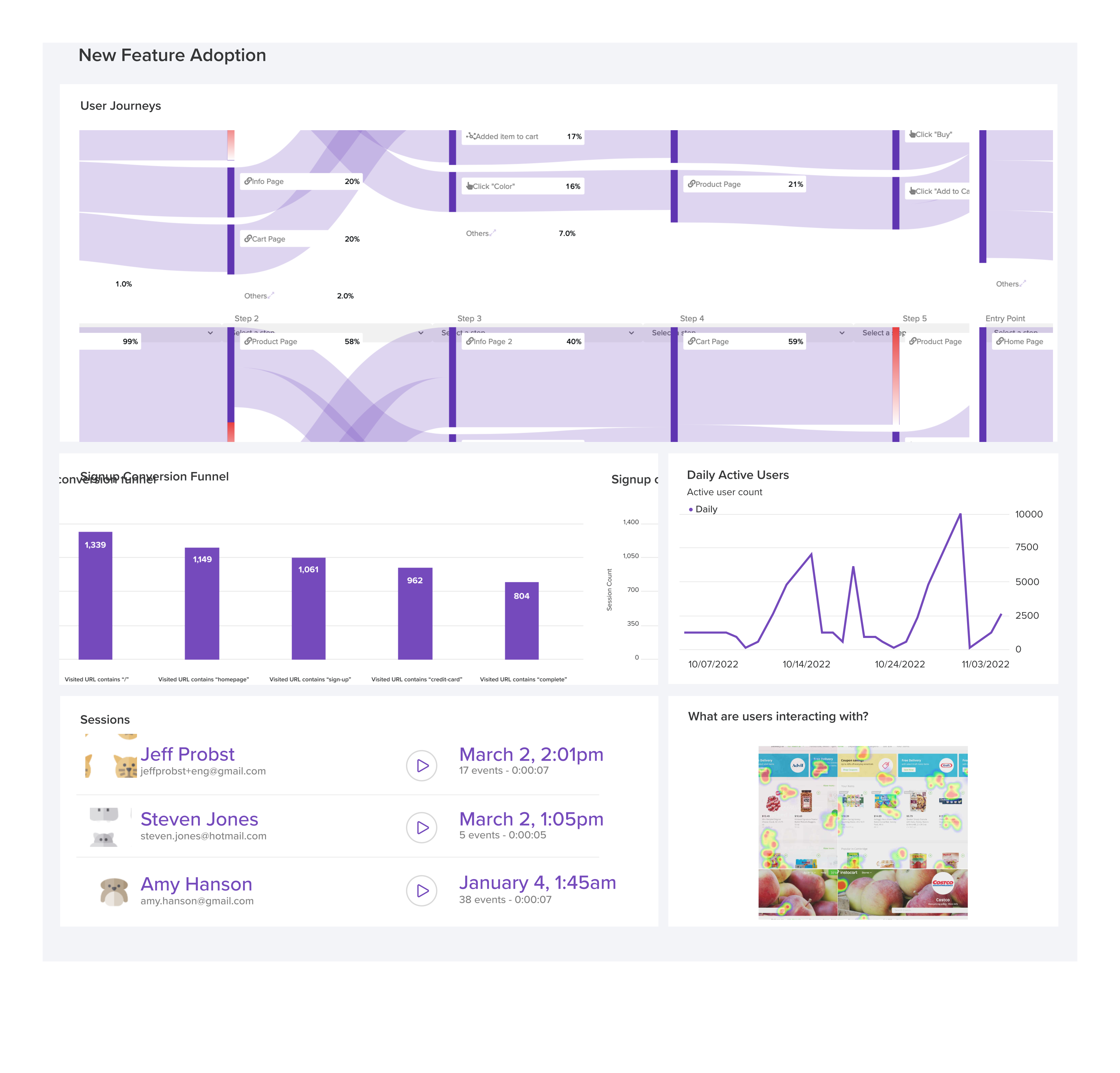
LogRocket's Galileo AI watches sessions and understands user feedback for you, automating the most time-intensive parts of your job and giving you more time to focus on great design.
See how design choices, interactions, and issues affect your users — get a demo of LogRocket today.
Learn how to build hero sections that load quickly, respond smoothly, and remain accessible, with practical checks for contrast, keyboard navigation, motion, media, and Core Web Vitals.
A design can look right and still fail in users’ hands. Learn how five kinds of prototype stress tests expose edge cases early, from awkward screen widths and real-world inputs to loading states, unexpected interactions, and accessibility.

Prepare your 2027 UX workflow with a practical guide to visualization tools, AI-assisted analytics, accessible charts, and a worked checkout example. Learn what to verify before acting on the data.

Explore how UX designers can use ADPList to find guidance and share experience, what to check before booking, and how its free and paid options compare with other mentorship platforms.

 Learn more →