
Adding fonts should not negatively affect performance. In this article, we will look at best practices for loading fonts in a Vue app.

font-face for custom fontsMaking sure fonts are properly declared is an important aspect of loading fonts. This is done by using the font-face property to declare your chosen font. In your Vue project, this declaration can be done in your root CSS file. Before we get into that, let’s look at the structure of the Vue app:
/root
  public/
    fonts/
      Roboto/
        Roboto-Regular.woff2
        Roboto-Regular.woff
    index.html
  src/
    assets/
      main.css
    components/
    router/
    store/
    views/
    main.js
We can make the font-face declaration in main.css like this:
// src/assets/main.css

@font-face {
  font-family: "Roboto";
  font-weight: 400;
  font-style: normal;
  font-display: auto;
  unicode-range: U+000-5FF;
  src: local("Roboto"), url("/fonts/Roboto/Roboto-Regular.woff2") format("woff2"), url("/fonts/Roboto/Roboto-Regular.woff") format("woff");
}
The first thing to note is font-display: auto. Using auto as the value allows the browser to use the most appropriate strategy to display the font. This depends on some factors like network speed, device type, idle time, and more.
To gain more control of how the font is loaded, you should use the font-display: block which instructs the browser to briefly hide the text until the font has fully downloaded. Other possible values are swap, fallback, and optional. You can read more about them here.
Something to note is unicode-range: U+000-5FF which instructs the browser to only load the required glyph ranges (U+000 – U+5FF). You also want to use woff and woff2 font formats which are optimized formats and work in most modern browsers.
Another thing to note is the src order. First, we check if a local copy of the font is available (local("Roboto")) and use it. A lot of Android devices come with Roboto pre-installed in which case, the pre-installed copy will be used. If a local copy is not available, it goes on to download the woff2 format if supported by the browser. Else, it skips to the next font in the declaration that is supported.
Once your custom fonts have been declared, you can tell the browser to preload the fonts ahead of time using <link rel="preload">. In public/index.html, add the following:
<link rel="preload" as="font" href="./fonts/Roboto/Roboto-Regular.woff2" type="font/woff2" crossorigin="anonymous">
rel="preload" instructs the browser to start fetching the resource as soon as possible. as="font" tells the browser this is a font so it prioritizes the request. Also note the crossorigin="anonymous" because, without it, the preloaded font will get discarded by the browser. This is because browsers fetch fonts anonymously so using this attribute allows the request to be made anonymously.
Using link=preload increases the chances that the custom font will be downloaded before it’s needed. This small tweak greatly speeds up load times of fonts and consequently, the rendering of text in your web application.
link=preconnect for hosted fontsWhen using hosted fonts from sites like Google fonts, you can get even faster load times by using link=preconnect. It tells the browser to establish a connection to the domain ahead of time.
If you were using the Roboto font served by Google fonts, you can do this in public/index.html:
<link rel="preconnect" href="https://fonts.gstatic.com">
...
<link href="https://fonts.googleapis.com/css2?family=Roboto&display=swap" rel="stylesheet">
This will establish the initial connection to the origin https://fonts.gstatic.com and by the time the browser needs resources from the origin, the connection will have already been established. The difference can be seen in the image below:
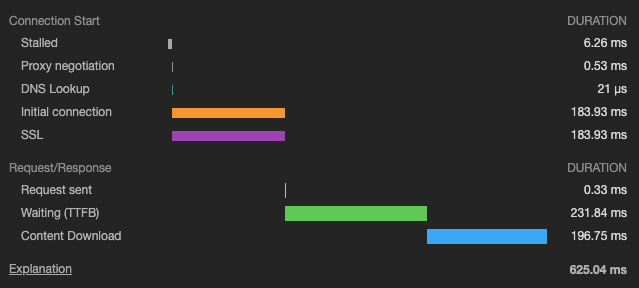
When the font is loaded without link=preconnect, you can see the time it takes to connect (DNS lookup, initial connection, SSL, etc). The results look very different when link=preconnect is used like this:
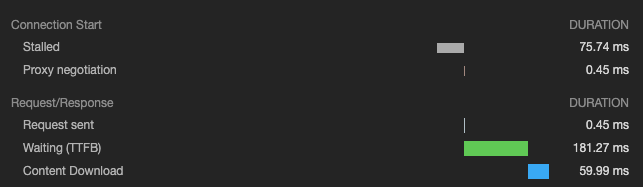
Here, you’ll notice the time taken for DNS lookup, initial connection, and SSL are no longer there because the connection has already been made earlier.

Fonts are static resources that don’t change a lot so they are good candidates for caching. Ideally, your web server should set a longer max-age expires header on fonts so the browser caches them for longer. If you are building a progressive web app (PWA), then you can use service workers to cache fonts and serve them directly from the cache.
To get started with building a PWA with Vue, use the vue-cli tool to generate a new project:
vue create pwa-app
Select the Manually select features option and then select Progressive Web App (PWA) Support:
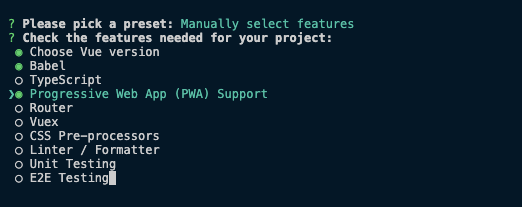
Those are the only things we need to generate a PWA template. Once it’s done, you can change directory to pwa-app and serve the app:
cd pwa-app
yarn serve
You will notice a file registerServiceWorker in the src directory which contains the default configuration. In the root of your project, create vue.config.js if it does not exist or add the following if it does:
// vue.config.js

module.exports = {
  pwa: {
    workboxOptions: {
      skipWaiting: true,
      clientsClaim: true,
    }
  }
}
The vue-cli tool generates the service worker with the PWA plugin. Under the hood, it uses Workbox to configure the service worker and the elements it controls, the caching strategy to use and other necessary configurations. In the code snippet above, we are making sure that our application is always being controlled by the latest version of the service worker. This is necessary because it ensures our users are always viewing the latest version of the application. You can check out the Workbox configuration documentation to gain more control of the behavior of the service worker that’s generated.
Next, we add our custom font to the public directory. I have the following structure:
root/
  public/
    index.html
    fonts/
      Roboto/
        Roboto-Regular.woff
        Roboto-Regular.woff2
Once you are done developing your Vue application, you can build it by running this command from your terminal:
yarn build
This outputs the results into the dist folder. If you inspect the contents of the folder, you’ll notice a file similar to precache-manifest.1234567890.js. It contains the list of assets to cache which is just a list of key-value pairs containing the revision and URLs:
self.__precacheManifest = (self.__precacheManifest || []).concat([
  {
    "revision": "3628b4ee5b153071e725",
    "url": "/fonts/Roboto/Roboto-Regular.woff2"
  },
  ...
]);
Everything in the public/ folder is cached by default which includes the custom font. With this in place, you can serve your application with a package like serve or host the dist folder on a web server to view the results. You can find a screenshot of the app below:

On subsequent visits, fonts are loaded from the cache which leads to faster load times of your application.
In this post, we’ve looked at some best practices to apply when loading fonts in Vue applications. Using these practices will ensure that you serve fonts that look nice without compromising the performance of your app.
Debugging Vue.js applications can be difficult, especially when users experience issues that are difficult to reproduce. If you’re interested in monitoring and tracking Vue mutations and actions for all of your users in production, try LogRocket.

LogRocket lets you replay user sessions, eliminating guesswork by showing exactly what users experienced. It captures console logs, errors, network requests, and pixel-perfect DOM recordings — compatible with all frameworks.
With Galileo AI, you can instantly identify and explain user struggles with automated monitoring of your entire product experience.
Modernize how you debug your Vue apps — start monitoring for free.

Learn how to run Cline locally with Ollama to build a secure, private AI coding agent that keeps your proprietary code off cloud servers.

Compare TanStack Charts, Recharts, and Chart.js by building the same React dashboard three times. See how each library’s mental model affects your code.

Is the Rust React Compiler’s 10x speed claim real? We put Babel, Vite (Oxc), and Bun to the test on a real app to find out where the speed actually matters.

Compare the top AI development tools and models of September 2026. View updated rankings, feature breakdowns, and find the best fit for you.
Hey there, want to help make our blog better?
Join LogRocket’s Content Advisory Board. You’ll help inform the type of content we create and get access to exclusive meetups, social accreditation, and swag.
Sign up now






