Brand archetypes create a cohesive personality. From a bird’s-eye view, that’s exactly what you want: every touchpoint feels like the same brand. But when you’re the one translating that personality into UX copy, an archetype can only take you so far.

This is because an archetype is categorical by design. You pick a category, such as the Explorer, and apply that personality across the brand. A category, though, is a type of person, not a person, and types don’t talk; people do.
In this article, I’ll share a technique you can use to bridge the gap between an abstract brand archetype and the words users actually read. I’ll also show how it works in practice by applying it to common UX writing scenarios.
This isn’t to say that brand archetypes are wrong. In fact, pairing a brand archetype with a user persona is a common approach to defining voice and tone.
Brand archetypes define who the brand is, while user personas help us understand who’s on the other end of the screen. Used together, they answer two essential questions: Who are we? and Who are we talking to? (If you’d like a deeper dive into how they differ, check out our article on brand archetype vs. persona.)
In practice, I’ve found that even when those questions are answered, there’s still another one to solve: What should this brand say in this moment?
An archetype might tell you your brand is a Caregiver, while a persona tells you your user is a first-time shopper worried about getting scammed. But when it’s time to craft copy for the checkout flow, you’re left wondering: How would a Caregiver reassure this person in this moment?
A personality type like the Caregiver has multiple facets that can be interpreted in different ways. One writer might focus on the Caregiver’s comforting nature, while another emphasizes its practical guidance.
In my experience, this is where sentence-level decisions become difficult. The broad personality is clear, but you still need to interpret it for every interaction.
To bridge this gap, I use a technique shared by Vitaly Friedman. He suggests that before writing UX copy, you imagine a real person speaking to the user.
Instead of writing for a broad archetype, imagine someone who embodies that archetype’s personality speaking directly to your user. This narrows the question from, “Does this sound like a Caregiver?” to “How would this person say it?”
This approach gives your brain something more concrete to work with. It’s much easier to imagine a conversation with a specific person than it is to translate abstract personality traits into words.
| Brand archetype | Imagined speaker | |
|---|---|---|
| Primary question | Who are we as a brand? | How would this person communicate in this scenario? |
| Approach | Categorical. Starts with a personality category, such as the Caregiver. | Generative. Creates a specific person who embodies the category, such as Sarah, a nurse. |
| What it does | Filters. You ask, “Does this sound like the Caregiver?” | Generates. You ask, “How would Sarah say this?” |
| Level of detail | Defines the personality, but leaves sentence-level decisions to the writer. | Provides enough detail to imagine the person’s word choice, tone, and phrasing. |
| Decision making | Requires writers to interpret broad personality traits each time. | Gives writers a concrete mental model for making writing decisions, so the tone shifts stay consistent across moments. |
Before you start: The imagined speaker exercise assumes you already know roughly how your brand should sound — you’ve picked an archetype, paired it with a persona, and now need to turn that into actual words.
If you haven’t defined a voice yet, start there. The goal of this exercise is to sharpen a voice you’ve already committed to, not to build one from scratch.
Friedman’s exercise is to picture a real person speaking to the user before choosing any words. But that person doesn’t have to be random. Instead, imagine someone who naturally embodies your brand archetype.
You don’t always have to invent them from scratch. You can borrow someone you already know who fits — a friend who remains calm under pressure, a mentor who’s naturally warm and reassuring — and write through them.
Say your archetype is a Caregiver. Rather than writing as “the Caregiver,” think of someone who exhibits qualities like compassion, patience, and care.
Now, visualize that person in enough detail that you can actually hear them speak:
Once you’ve done this, writing becomes more about imagining the speaker interacting with users. You can picture them standing beside the product, talking users through what’s happening, explaining an error, offering reassurance, or even onboarding a new customer.
Your job at this point is simply to capture what they’d naturally say.
Let’s say we’re writing UX copy for a meal planner app, MealPlan, that helps users plan weekly meals, track their nutrition goals, and build healthier eating habits.
Our brand archetype is the Caregiver.
Rather than writing as an abstract Caregiver, we’ll imagine Sarah: a nurse who calmly reassures anxious patients. She never rushes people, avoids jargon, and takes her time to explain each step before expecting them to take action. When someone is worried, she acknowledges their concern before offering guidance.
The question now becomes, “How would Sarah talk to users as they navigate this product?”
A new user just downloaded the app because they’re trying to lose weight and want help planning their weekly meals and tracking calories. They’re hopeful the app can help, but don’t know how it works yet.
What Sarah thinks:
This is their first impression of us. Before asking them to create an account, I want them to feel welcome and understand how we can help them.
What Sarah says:
Headline: Welcome to MealPlan
Body: Let’s make healthy eating a little easier with personalized meal plans.
CTA: Get started
The user has created an account. Before generating a meal plan, the app needs to understand their health goals, dietary preferences, allergies, activity level, weekly food budget, and any foods they’d like to avoid.
What Sarah thinks:
I’m about to ask for personal information. Before I ask any questions, I need them to understand why we need the information and how we’ll use it to help them. That way, sharing these details feels worthwhile, not intrusive.
What Sarah says:
Headline: Let’s personalize your meal plan
Body: We’ll ask a few quick questions about your goals, preferences, and weekly food budget so we can tailor your meal plan to you.
CTA: Personalize my plan
The user is trying to subscribe to a monthly plan, but their card is declined at checkout.
What Sarah thinks:
Something interrupted their checkout. To reduce confusion and uncertainty, I need to help them understand what happened, reassure them that they can still complete their subscription, and explain the options they have.
What Sarah says:
Headline: Your payment didn’t go through
Body: We couldn’t process your payment using this card. You can still complete your subscription by trying again or choosing a different payment method.
Primary CTA: Try again
Secondary CTA: Change payment method
Notice how Sarah’s voice doesn’t change across all three scenarios. She stays true to the Caregiver archetype by being calm, reassuring, and supportive. What changes, however, is her tone. She adapts to the user’s emotional state: welcoming new users during onboarding, being transparent when requesting information, and providing reassurance when something goes wrong.
By writing through the imagined speaker, the right tone emerges naturally.
This exercise works particularly well when you’re a solo writer handling copy end to end, because the speaker can live entirely in your head.
But it doesn’t have to stay there forever.
If you’re part of a team, defining the imagined speaker can become a collaborative exercise. Instead of leaving the Caregiver archetype open to individual interpretation, the team defines one shared speaker everyone can write through.
One way to do this is through a collaborative workshop. Start by choosing the imagined speaker together, then use sticky notes to flesh out details like their background, personality, communication style, values, and habits until everyone has a similar picture in mind.
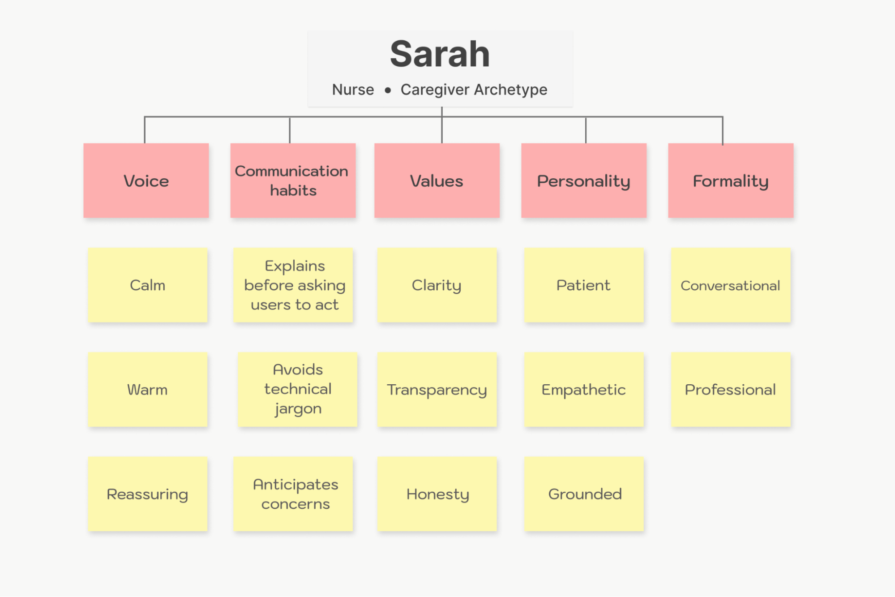
Agreeing that the speaker is Sarah, a nurse, rather than simply a Caregiver, leaves little room for interpretation and makes it easier for the team to write consistently.
Your imagined speaker can be used to improve your AI outputs too. Rather than relying on vague prompts during copy brainstorming sessions, you can give the model details of your imagined speaker and ask it to write as that person.
For example:
Write an error message for a user whose card was declined while subscribing to a monthly plan. Write as Sarah, a nurse who calmly reassures anxious patients. She explains each step before asking users to take action, avoids jargon, acknowledges concerns before offering guidance, and helps people understand what happens next.
If you combine this with product context, you’ll get outputs that are more human and better aligned with your product’s voice.
Another way to use the imagined speaker is to build it into your custom GPT alongside your content style guide, content principles, and other brand documentation. This will give the model a richer understanding of how your brand communicates.
Brand archetypes and user personas are great foundations for defining your brand voice and tone. The imagined speaker exercise discussed in this article isn’t meant to replace them. Instead, it acts as a bridge between these artifacts and the words users actually read.
By imagining a real person behind your brand, you give yourself something more tangible to write through. Rather than trying to translate an abstract archetype into words, you begin asking a much simpler question: What would the imagined speaker say?
That single shift can be the difference between copy that merely sounds on-brand and copy that feels unmistakably human.
LogRocket's Galileo AI watches sessions and understands user feedback for you, automating the most time-intensive parts of your job and giving you more time to focus on great design.
See how design choices, interactions, and issues affect your users — get a demo of LogRocket today.

Not every enterprise product needs to be intuitive. Complex workflows often require complexity, and trying to eliminate it can make products less powerful for experienced users. Explore why enterprise UX should balance intuitiveness with learnability, efficiency, and long-term mastery.

Open-source Figma alternatives are becoming viable for teams seeking self-hosting, open file formats, offline access, flexible AI integrations, and greater control over their design workflows. Compare Penpot, OpenPencil, Quant UX, and Open Design to see where open-source tools stand against Figma.

I used to leave design reviews with a stack of subjective edits. Then I learned to tell the story behind my work and rework dropped fast.

Learn what human-computer interaction is, discover its principles, and take a look at interaction design in HCI and its applications here.


 Learn more →