
AI agents can now handle a surprising amount of what I think of as WTRD: write, test, review, and deploy code. Claude is one of the frontrunners in that shift, so I tried something simple: I handed it one of my React codebases and told it to write the entire test suite.

What came back was impressive, confidently wrong in places, and more useful than I expected.
This article isn’t really about whether AI can write tests at all. It clearly can. The more useful question is where AI-generated tests actually save time, and where they quietly introduce false confidence. To make that visible, I had Claude log every failed assumption before fixing it. So instead of a neat success story, we get the full paper trail.
The app I used is one I maintain for LogRocket. It’s an AI development tools comparison dashboard that lets frontend developers select up to four AI models or coding tools side by side and compare them across dozens of features:
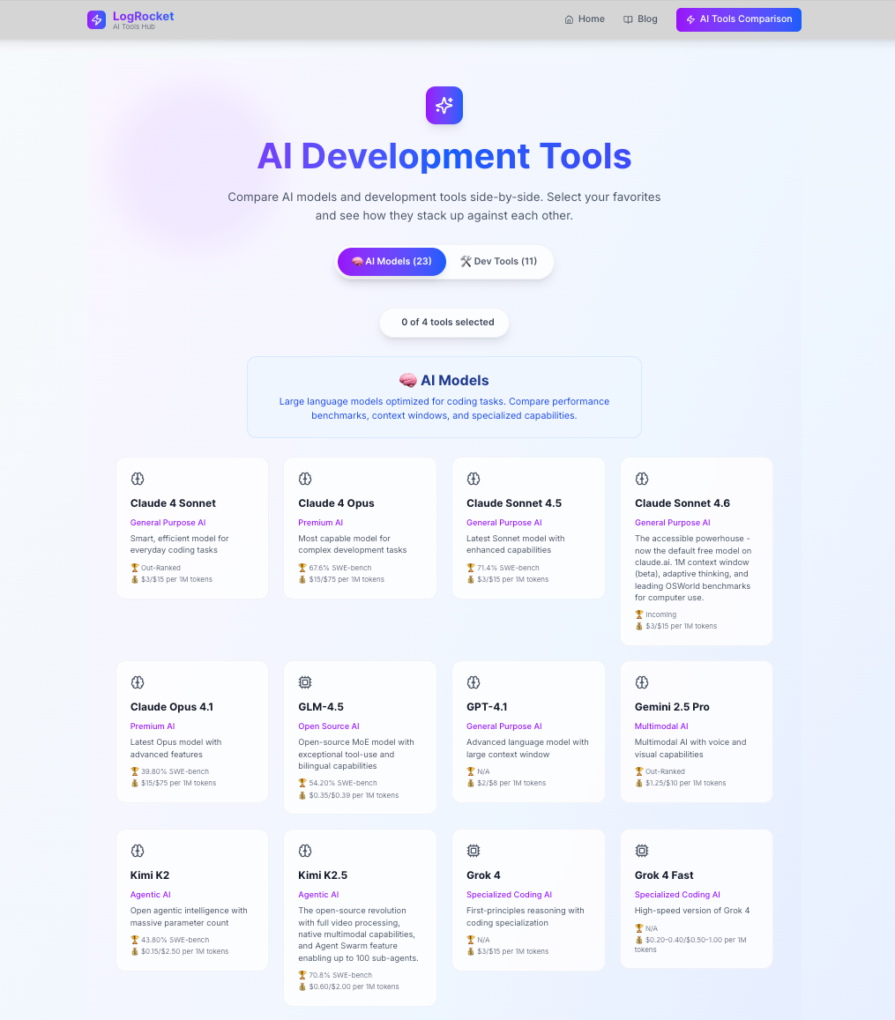
It’s a good test subject for three reasons:
It has real logic worth testing: The getRecommendation() function inside ComparisonTable runs a scoring algorithm: 60 percent feature coverage and 40 percent SWE-bench score for AI models, and it only shows a winner if the margin is clear enough. That’s real conditional logic with real edge cases.
It has no existing tests: Before this, I hadn’t written any tests. Since I was finally going to write them, I figured I might as well document the process too. That also made the experiment cleaner: with no prior tests in the repo, Claude had no existing style or conventions to mimic. It had to infer them from the components themselves.
The component structure creates selector traps: Tool names appear in multiple places: in the header, in the recommendation banner, and in the stats footer. Any agent leaning on getByText without thinking will hit duplicate element errors immediately. Spoiler: that’s exactly what happened.
The stack is Next.js 15, React 19, TypeScript, Tailwind CSS, and Lucide icons. There’s no state management library and no data fetching, just props, local state, and a large data.ts file containing all the AI model and tool data.
The three files that matter in the application are:
src/lib/data.ts — pure data and helper functions (getAIModels, getDevelopmentTools, getToolsByCategory, getRelevantFeatureCategories)src/components/ToolSelector.tsx — the selection UI, including tab switching and the four-tool limitsrc/components/ComparisonTable.tsx — the comparison grid, category expand/collapse, CSV export, and the recommendation engineBefore sending anything to Claude Code, it helps to understand what we’re actually trying to cover and why each piece matters.
data.tsThe helper functions in data.ts are the foundation everything else builds on. getRelevantFeatureCategories, in particular, is unostentatiously important. It determines which feature rows show up in the comparison table based on whether the user selected AI models, dev tools, or a mix.
If that function returns the wrong categories, the entire table renders incorrectly, and no one would necessarily notice without a test. These are also the easiest tests to write, and the ones AI agents mostly get right.
ToolSelectorThe selector has two behaviors worth testing. First, the four-tool limit: when you try to add a fifth tool, it should replace the first one, not silently fail or throw an error. Second, the Compare button should be disabled until two tools are selected.
ComparisonTableThis is where it gets interesting. The comparison table has more state than it first appears to. Categories can be individually expanded or collapsed, the recommendation banner appears conditionally, and features render different icons depending on whether their value is true, false, or a string like "Limited". The CSV export also triggers a file download using the browser’s URL.createObjectURL API, which doesn’t exist in a test environment and needs to be mocked.
This component is also where all four of Claude Code’s documented mistakes happened. Not a coincidence.
I kept it tight. Here’s what I gave Claude Code:
Generate a comprehensive test suite for this Next.js 15 + React 19 app.
Read the codebase, do not ask questions.

Setup: install vitest, @testing-library/react, @testing-library/jest-dom,
@testing-library/user-event, jsdom. Create vitest.config.ts, src/test/setup.ts,
add "test": "vitest" to package.json.

Write tests for:
- src/lib/data.test.ts (unit tests for all helper functions + data validation)
- src/components/ToolSelector.test.tsx (rendering, tab switching, selection
  limit, compare button states, onCompare callback)
- src/components/ComparisonTable.test.tsx (empty state, tool headers,
  expand/collapse, feature icons, CSV export, recommendation logic)

Run with `npx vitest run`. Fix all failures until the suite passes.

Important: maintain MISTAKES.md at the root. Every time a test fails, log it immediately with: the file, what you wrote, the exact error,
why it was wrong, how you fixed it, and the category (Phantom selector / Wrong
assertion / Mock scoping / Over-mocking / Missing provider / Async handling).
Log at the moment of failure.
The MISTAKES.md instruction is the most important line in that prompt. It forces the agent to document its mistakes so you can see exactly what went wrong and how it recovered.
Claude Code set up the infrastructure correctly on the first pass: vitest.config.ts, setup.ts, and the jsdom environment config. No issues there. It also nailed all 14 unit tests in data.test.ts without a single failure. Pure functions, clear contracts, no surprises.
Then it hit the components.
ToolSelector.test.tsx had nine tests, and all of them passed cleanly. The component is relatively straightforward to query: buttons have visible text, the heading is unique, and the selection counter updates predictably.
ComparisonTable.test.tsx is where the failures started. It had 14 tests total, with four failures before corrections. Every single failure was in this file.
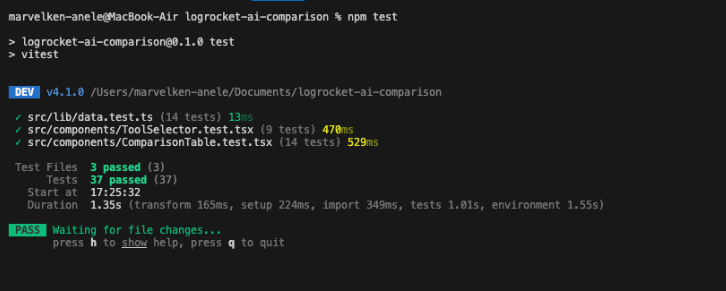
Clean. But the path to get there was a bit messier than that output suggests.
We’ll go through each failure.
File: ComparisonTable.test.tsx
// ❌ What Claude Code wrote
expect(screen.getByText(tool.name)).toBeInTheDocument();
Error:
TestingLibraryElementError: Found multiple elements with the text: Claude 4 Sonnet
Why it failed: Tool names appear in at least two places in ComparisonTable: once in the tool header section and again in the recommendation banner when that tool wins. getByText throws as soon as it finds more than one match.
The fix: Switch to getAllByText and assert that at least one instance exists, or use within() to scope the query to the header section specifically.
Here is the prompt used to get that fixed:
When querying for tool names in ComparisonTable, use getAllByText
or scope queries with within() — tool names appear in multiple
locations in this component.
File: ComparisonTable.test.tsx
// ❌ What Claude Code wrote
// Test: "Recommendation banner does NOT appear when tools are equally matched"
// Used the first two tools in toolData assuming they'd score the same
const tools = ['claude-sonnet-4', 'claude-opus-4']
render(<ComparisonTable selectedTools={tools} />)
expect(screen.queryByText(/Recommended/i)).not.toBeInTheDocument()
Error: The test failed because those two tools are not equally matched. Claude Opus 4 has a higher SWE-bench score, so the recommendation banner appears.
Why it failed: Claude Code invented a test scenario based on what it assumed about the data instead of checking what the data actually said. It picked two tools that sounded comparable and hoped the recommendation logic agreed.
The fix: Change the test to either verify component rendering without making assumptions about which tools trigger recommendations, or find two tools with genuinely identical feature counts.
This is the most instructive failure in the log. The agent knew the shape of the test it needed to write, a negative assertion on a conditional UI element, but it didn’t know the data well enough to pick the right inputs. It tested a scenario it invented rather than one it verified.
Here is the prompt used to get that fixed:
For the "no recommendation" test case, do not assume which tools
will be equally matched. Read the getRecommendation() function
logic first, then choose inputs that would produce a tie based
on the actual scoring algorithm.
File: ComparisonTable.test.tsx
// ❌ What Claude Code wrote
expect(screen.getByText(/Full Support/i)).toBeInTheDocument();
Error:
TestingLibraryElementError: Found multiple elements with the text: Full Support
Why it failed: “Full Support” appears in the legend at the bottom of the table and in the recommendation banner text (“14 Full Support Features”). Same root cause as Mistake #1: the agent reached for getByText without checking whether the text was unique in the DOM.
The fix: Use getAllByText or scope the query to the legend section with within().
File: ComparisonTable.test.tsx
// ❌ What Claude Code wrote
expect(screen.getByText(/Feature Comparison/i)).toBeInTheDocument();
Error:
TestingLibraryElementError: Found multiple elements with the text: /Feature Comparison/i
Why it failed: The regex /Feature Comparison/i matches both the <h2> heading (“Feature Comparison”) and a sentence in the recommendation banner (“Based on feature comparison, Claude 4 Sonnet has…”). The agent intended to find the heading, but the regex was too loose.
The fix: Switch to getByRole('heading', { name: /Feature Comparison/i }), which targets the semantic element specifically.
Here is the prompt used to get that fixed:
Use getByRole('heading') for heading elements rather than getByText
— this component has banner text that contains the same words as
headings and will cause duplicate match errors.
Looking at those four mistakes, a clear pattern emerges: every failure happened in ComparisonTable, and every one came from the same underlying issue. The agent didn’t realize that certain text appears in multiple DOM locations.
That isn’t random. ComparisonTable is the component where content is generated dynamically from the recommendation engine. Text in the banner is built from the same data that appears in the table headers. The agent wrote tests as if it were dealing with a simpler component where each piece of text appears once.
Here’s the breakdown:
| Category | Count |
|---|---|
| Phantom selector (duplicate text) | 3 |
| Wrong assertion (bad data assumption) | 1 |
| Mock scoping | 0 |
| Over-mocking | 0 |
| Missing provider | 0 |
| Async handling | 0 |
Three out of four failures were the same mistake with different strings. That’s actually useful information. It tells you that if you’re testing a component where dynamic content can appear in multiple places, you need to be explicit in your prompt about which queries to use.
It also suggests something more important: if the failures cluster this tightly, the agent is teachable. You’re not dealing with random breakage. You’re dealing with a repeated blind spot that you can correct.
Four mistakes is not the whole story. The more interesting question is what Claude Code handled correctly without any guidance.
The CSV export mock. The export button in ComparisonTable calls window.URL.createObjectURL, a browser API that doesn’t exist in jsdom. Mocking this correctly requires:
global.URL.createObjectURL = vi.fn(() => 'mock-url')
global.URL.revokeObjectURL = vi.fn()
Claude Code added this to the test setup without being asked. It recognized the browser API dependency, knew it would fail in a test environment, and mocked it preemptively. That’s not nothing.
The empty state test. ComparisonTable returns null when selectedTools is an empty array. Claude Code wrote:
it('renders nothing when selectedTools is empty', () => {
  const { container } = render(<ComparisonTable selectedTools={[]} />)
  expect(container.firstChild).toBeNull()
})
Clean. And I hadn’t explicitly asked for that exact assertion pattern. I just said the component should return null or render nothing when selectedTools is an empty array, and it translated that into the right test.
The feature icon tests. The comparison table renders three different icons depending on a feature’s value: a checkmark for true, an X for false, and a warning triangle for strings like "Limited". Claude Code correctly set up mock data with all three value types and wrote separate assertions for each icon. It didn’t test one and assume the others worked.
The most useful takeaway from this experiment is not that AI can write tests. It can. The more useful takeaway is that some categories of tests are much safer to hand off than others.
That’s really the decision framework this experiment points to. AI-generated testing is strongest when the component contract is explicit and the UI is straightforward. It gets much shakier when the test has to “understand” ambiguous product behavior instead of just asserting it.
A three-file app with 37 tests is a controlled experiment. Real applications have hundreds of components, shared context providers, authenticated routes, and data-fetching layers. Here’s how the approach changes.
Don’t ask for “all tests for the entire app.” Ask for unit tests for utilities first and let those pass. Then move to isolated components, then components with context, then page-level integration tests. Each layer builds on the last.
Most real apps have a custom renderWithProviders wrapper that sets up auth context, query clients, and routing. If you don’t tell the agent that exists, it will render components naked and then wonder why they crash. Include it explicitly. Something like this helps:
We have a custom render helper at src/test/utils.tsx that wraps
components with QueryClientProvider, AuthProvider, and MemoryRouter.
Use this for all component tests — never use RTL's render directly.
If your component library uses custom data-testid conventions, or if you’ve standardized on getByRole as the preferred query strategy, say so. The agent defaults to whatever pattern it sees most often in the component, which in a Tailwind app with limited semantic HTML is often getByText, and that is not always the best option.
Always ask for a MISTAKES.md file. After the first run, read it and look for patterns. If three failures are all “missing provider,” add a note to the prompt. If two are “duplicate text,” add a note about your component structure. Each iteration gets tighter based on the failure categories the previous run produced.
An AI-generated suite can report 80 percent coverage while testing nothing meaningful. If the agent over-mocks, it is measuring its own mock coverage, not your logic. After every run, manually review five or six tests at random and ask yourself: if I introduced a bug here, would this test actually catch it?
So, should you let an agent write your test suite?
Yes, if what you need is fast first-pass coverage. Agents are very good at the volume problem in testing: turning a blank repo into a working suite for obvious behaviors, pure utilities, and deterministic UI. In this case, Claude produced a passing suite across three files in minutes, which would have taken me hours by hand.
But this experiment also shows where the handoff breaks down. The failures were not random. They clustered around ambiguous selectors, repeated text, and unverified assumptions about app data. In other words, the agent struggled less with test syntax than with reading the product correctly.
That is the real takeaway. AI testing works best as a force multiplier, not a final authority. Use it to generate the first draft, especially for straightforward logic and component coverage. Then review the tests where the UI is dynamic, the data is meaningful, or the assertions could pass for the wrong reason. The green checkmarks matter, but only if you know what they’re actually proving.

Learn how to run Cline locally with Ollama to build a secure, private AI coding agent that keeps your proprietary code off cloud servers.

Compare TanStack Charts, Recharts, and Chart.js by building the same React dashboard three times. See how each library’s mental model affects your code.

Is the Rust React Compiler’s 10x speed claim real? We put Babel, Vite (Oxc), and Bun to the test on a real app to find out where the speed actually matters.

Compare the top AI development tools and models of September 2026. View updated rankings, feature breakdowns, and find the best fit for you.
Would you be interested in joining LogRocket's developer community?
Join LogRocket’s Content Advisory Board. You’ll help inform the type of content we create and get access to exclusive meetups, social accreditation, and swag.
Sign up now


 Learn more →



