For years, performance optimization mostly meant speed. Faster load times, lower latency, smoother UX. If your app felt slow, users simply left. But the rules are starting to change.

As more applications become AI-powered and agentic, optimizing for speed alone is no longer enough. Now we also have to think about token usage. Every prompt, every response, every tool call carries a cost. Tokens influence latency, infrastructure spend, and how well your system scales.
If you’re building LLM-powered applications, you’ve probably seen this firsthand. Responses that run longer than necessary. Context windows are filling up faster than expected. Costs are gradually creeping upward. Workflows are slowing down because the model is processing more information than it actually needs.
This is a different kind of performance engineering.
In this guide, we’ll explore ten practical tools and response formats you can start using today to make your LLM applications more efficient, more cost-effective, and more scalable without sacrificing capability.
An AI token is the smallest unit of data that an AI model processes. Input to the LLM and output from the LLM add up to the total token used. For instance, if your input runs into 230 tokens and receives an output of 150 tokens, your total usage for that interaction will be 380 tokens.
The tools and formats that we will be looking at involve reducing token usage during input and output.
To follow along with the code examples in this guide, you will need:
Let’s set up our testing arena.
For this guide, we will be using the Gemini SDK together with its API key for our demonstrations.
The tools and formats demonstrated here can be implemented using other LLM providers, but we will be using Google Gemini to demonstrate.
First, go ahead and install the Google AI SDK for Node.js.
Run the command below to install Google Gemini SDK:
npm install @google/genai
Then go ahead and create a .env file in your project root and paste in your Gemini API key.
GEMINI_API_KEY=YOUR_API_KEY_HERE
Next, we will use the count tokens method in the Gemini SDK to count the tokens used in a given prompt. This will be our tool for measuring the before and after of some of the optimizations.
Go ahead and create a JavaScript file for this.
Now, let’s get into the optimizations.
One of the mistakes developers make is not writing the system instructions. This forces the model to reprocess the same rules with every request, bloating your input tokens.
When you include persona setting directly within your user prompt, these instructions are counted as part of your input tokens for every single request. This leads to increased token usage, especially over multiple interactions:
import { GoogleGenAI } from '@google/genai';

const ai = new GoogleGenAI({apiKey: import.meta.env.VITE_GEMINI_API_KEY});

export async function measurePrompt(promptText = "You are a helpful assistant that always responds in a friendly tone.Tell me about the benefits of exercise.") {
  try {
    const { totalTokens } = await ai.models.countTokens({
      model: "gemini-3-flash-preview",
      contents: [{ role: "user", parts: [{ text: promptText }] }],
    });
    console.log(`Token count for "${promptText}": ${totalTokens}`);
    return totalTokens;
  } catch (error) {
    console.error("Error measuring prompt tokens:", error);
    return null;
  }
}

measurePrompt();
Look at the token count below:
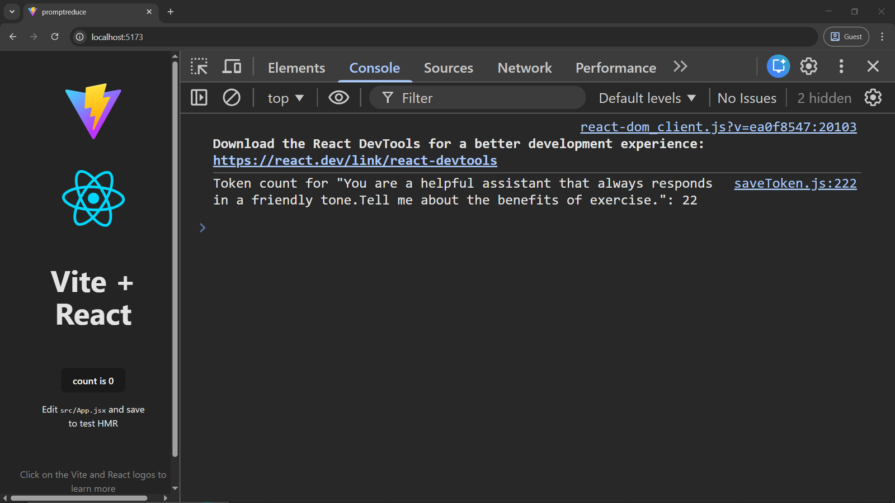
Below is how you can do it instead.
Run the code below and see it in practice:
import { GoogleGenAI } from '@google/genai';

const ai = new GoogleGenAI({apiKey: import.meta.env.VITE_GEMINI_API_KEY});

export async function generateContentWithSystemInstructions() {
  const systemInstruction = "You are a helpful assistant that always responds in a friendly tone.";
  const userPrompt = "Tell me about the benefits of exercise.";

  try {
      const contentsForUserPromptTokenCount = [
      { role: "user", parts: [{ text: userPrompt }] },
    ];
    const { totalTokens: userPromptTokens } = await ai.models.countTokens({
      model: "gemini-3-flash-preview",
      contents: contentsForUserPromptTokenCount,
    });
    console.log(`Tokens used for user prompt: ${userPromptTokens}`);

    const response = await ai.models.generateContent({
      model: "gemini-3-flash-preview",
      contents: [{ role: "user", parts: [{ text: userPrompt }] }],
      config: {
        systemInstruction: systemInstruction,
      },
    });
    console.log("Generated Content (with system instruction):", response.text);
    return response.text;
  } catch (error) {
    console.error("Error generating content:", error);
    return null;
  }
}
generateContentWithSystemInstructions();
Notice how we’ve stated the persona the LLM agent is supposed to take. This works because system prompts are not part of the AI prompt count.
Now, check the number of tokens saved in the console:
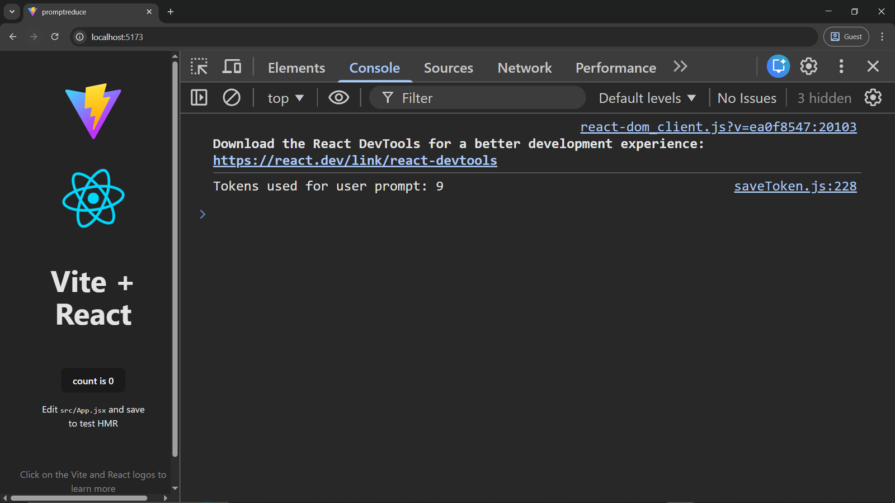
By setting the system instruction, the token count was reduced from 22 to 9.
One of the problems with AI is that they are prone to generating unnecessary completions or filler words that add up in the final token count. You can define a stopsequence to instruct the model to immediately stop generation when it hits a specific character or pattern.
import {GoogleGenAI,} from "@google/genai";

const ai = new GoogleGenAI({apiKey: import.meta.env.VITE_GEMINI_API_KEY});

export async function generateContentWithOutStopSequences() {
  const userPrompt = "Generate a short headline for a tech article. Start with 'Headline:'";

  try {
    const response = await ai.models.generateContent({
      model: "gemini-3-flash-preview",
      contents: [{ role: "user", parts: [{ text: userPrompt }] }],
    });
    const generatedText = response.text;

    const { totalTokens } = await ai.models.countTokens({
      model: "gemini-3-flash-preview",
      contents: [{ role: "model", parts: [{ text: generatedText }] }],
    });

    console.log(`Generated Content (without stop sequences): ${generatedText}`);
    console.log(`Tokens used for output (without stop sequences): ${totalTokens}`);
    return { generatedText, totalTokens };
  } catch (error) {
    console.error("Error generating content without stop sequences:", error);
    return null;
  }
}

generateContentWithOutStopSequences();
Check out the tokens we used without StopSequences:
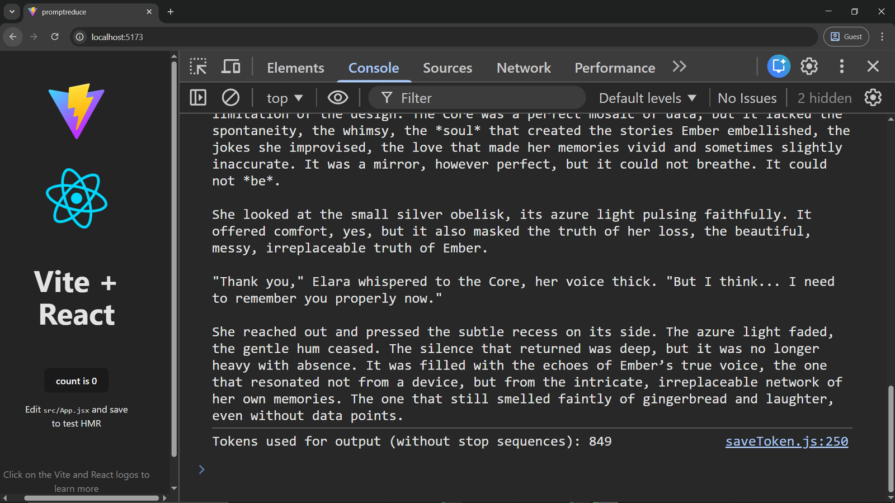
We will go on and define a stop sequence.
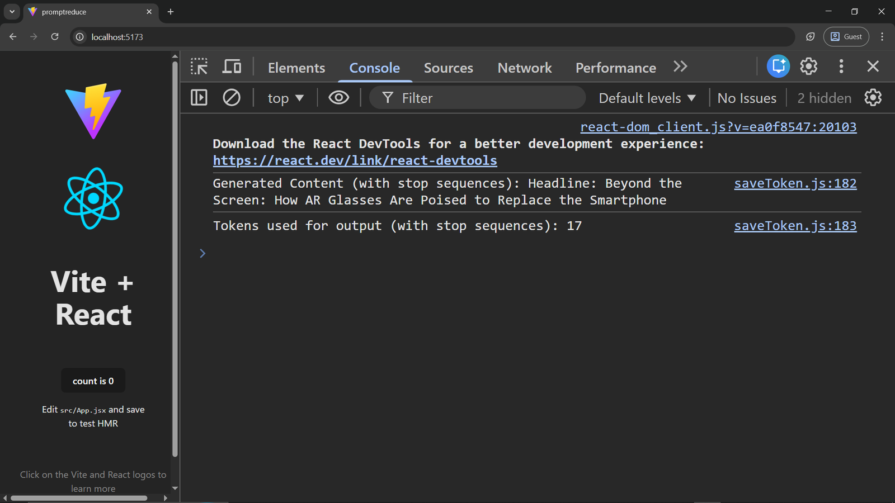
By defining stopSequences we instruct the model to stop generating as soon as it encounters any of the specified sequences.
For example, we only need a single line, so we stopped at the first newline character.
import {GoogleGenAI,} from "@google/genai";

const ai = new GoogleGenAI({apiKey: import.meta.env.VITE_GEMINI_API_KEY});

export async function generateContentWithStopSequences() {
  const userPrompt = "Generate a short headline for a tech article. Start with 'Headline:'";
  const generationConfig = {
    stopSequences: ["\\n"],
  };

  try {
    const response = await ai.models.generateContent({
      model: "gemini-3-flash-preview",
      contents: [{ role: "user", parts: [{ text: userPrompt }] }],
      generationConfig,
    });
    const generatedText = response.text;

    const { totalTokens } = await ai.models.countTokens({
      model: "gemini-3-flash-preview",
      contents: [{ role: "model", parts: [{ text: generatedText }] }],
    });

    console.log(`Generated Content (with stop sequences): ${generatedText}`);
    console.log(`Tokens used for output (with stop sequences): ${totalTokens}`);
    return { generatedText, totalTokens };
  } catch (error) {
    console.error("Error generating content with stop sequences:", error);
    return null;
  }
}

generateContentWithStopSequences();
Now, let’s look at the token savings:
If you are building a simple Optical Character Recognition (OCR) or classification application with LLM, sending a high-quality image to the AI for processing will be overkill, as you will be burning massive amounts of tokens for this. You can instead adjust the mediaResolution parameter to reduce the image quality before processing.
Let’s check out how this can reduce token usage.
When mediaResolution is set to MEDIA_RESOLUTION_HIGH, the model processes the image with maximum detail.
import { GoogleGenAI, MediaResolution } from '@google/genai';

const ai = new GoogleGenAI({apiKey: import.meta.env.VITE_GEMINI_API_KEY});

export async function describeImageWithHighResolution() {
  const imagePart = {
    inlineData: {
      mimeType: "image/jpeg",
      data: "iVBORw0KGgoAAAANSUhEUgAAAAEAAAABCAQAAAC1HAwCAAAAC0lEQVR42mNkYAAAAAYAAjCB0C8AAAAASUVORK5CYII="
    },
  };
  const userPrompt = "Describe this image in detail.";

  try {
    const contentsForTokenCount = [
      { role: "user", parts: [{ text: userPrompt }] },
      { role: "user", parts: [imagePart] },
    ];
    const { totalTokens: promptAndImageTokens } = await ai.models.countTokens({
      model: "gemini-3-flash-preview",
      contents: contentsForTokenCount,
    });
    console.log(`Tokens used for image description prompt and image (High Resolution): ${promptAndImageTokens}`);

    const response = await ai.models.generateContent({
      model: 'gemini-3-flash-preview',
      contents: [{ role: "user", parts: [{ text: userPrompt }, imagePart] }],
      config: {
        mediaResolution: MediaResolution.MEDIA_RESOLUTION_HIGH
      }
    });
    console.log("Image Description (High Resolution):", response.text);
    return response.text;
  } catch (error) {
    console.error("Error describing image (High Resolution):", error);
    return null;
  }
}

describeImageWithHighResolution();
Let’s now go ahead and try with the same image and with the resolution set to low.
Changing the media resolution to MEDIA_RESOLUTION_LOW on a real image or content will bring down the number of tokens used:
mediaResolution: MediaResolution.MEDIA_RESOLUTION_LOW
Another format to try is configuring the thinking budget. Models can generate a lot of internal thought tokens before even providing an answer. While this is great for complex tasks, it’s overkill for simple tasks. For simple tasks, cap or disable thoughts.
Below is how to achieve this with Gemini:
import {GoogleGenAI} from "@google/genai";
const ai = new GoogleGenAI({apiKey: import.meta.env.VITE_GEMINI_API_KEY});

export async function generateContentWithThinkingDisabled() {
  const userPrompt = "What is AI?";
  const modelName = "gemini-2.5-pro";

  try {
    const response = await ai.models.generateContent({
      model: modelName,
      contents: [{ role: "user", parts: [{ text: userPrompt }] }],
      config: {
        thinkingConfig: {
          thinkingBudget: 0
        },
      },
    });
    const generatedText = response.text;

    const { totalTokens } = await ai.models.countTokens({
      model: modelName,
      contents: [{ role: "model", parts: [{ text: generatedText }] }],
    });

    console.log(`Generated Content (thinking disabled): ${generatedText}`);
    console.log(`Tokens used for output (thinking disabled): ${totalTokens}`);
    return { generatedText, totalTokens };
  } catch (error) {
    console.error("Error generating content with thinking disabled:", error);
    return null;
  }
}

generateContentWithThinkingDisabled();
Setting the thinkingBudget to 0 disables thinking.
Context caching is another format you can use to reduce token usage in LLM prompts.
This comes in handy if you are building a Retrieval Augmented Generation (RAG) application where users get to upload, let’s say, a pdf file and get output based on the uploaded document.
With context caching, you basically pin a particular document, like a pdf file, in the model’s memory for a specified period of time. This is not free but useful if you will be making multiple accesses to a particular document in a specified period.
Let’s see how to implement it:
import {
  GoogleGenAI,
  createUserContent,
  createPartFromUri,
} from "@google/genai";

const ai = new GoogleGenAI({apiKey: import.meta.env.VITE_GEMINI_API_KEY});

export async function processTranscriptWithCache() {
  try {
    const dummyFileContent = "This is a sample transcript about a meeting discussing project milestones and future plans.";
    const dummyFile = new Blob([dummyFileContent], { type: "text/plain" });

    const doc = await ai.files.upload({
      file: dummyFile,
      config: { mimeType: "text/plain" },
    });
    console.log("Uploaded file name:", doc.name);

    const modelName = "gemini-3-flash-preview";
    const systemInstruction = "You are an expert analyzing transcripts.";
    const userPrompt = "Please summarize this transcript";

    const contentsForCacheTokenCount = [
      { role: "user", parts: [{ text: systemInstruction }] },
      createUserContent(createPartFromUri(doc.uri, doc.mimeType)),
    ];
    const { totalTokens: cacheCreationTokens } = await ai.models.countTokens({
      model: modelName,
      contents: contentsForCacheTokenCount,
    });
    console.log(`Tokens used for cache creation (system instruction + file content): ${cacheCreationTokens}`);

    const cache = await ai.caches.create({
      model: modelName,
      config: {
        contents: createUserContent(createPartFromUri(doc.uri, doc.mimeType)),
        systemInstruction: systemInstruction,
      },
    });
    console.log("Cache created:", cache);

    const contentsForGenerateTokenCount = [
      { role: "user", parts: [{ text: userPrompt }] },
      { role: "user", parts: [{ text: `cachedContent: ${cache.name}` }] },
    ];
    const { totalTokens: generateContentTokens } = await ai.models.countTokens({
      model: modelName,
      contents: contentsForGenerateTokenCount,
    });
    console.log(`Tokens used for generate content prompt (user prompt + cache reference): ${generateContentTokens}`);

    const response = await ai.models.generateContent({
      model: modelName,
      contents: userPrompt,
      config: { cachedContent: cache.name },
    });
    console.log("Response text (from cached transcript summary):", response.text);

    await ai.files.delete({name: doc.name});
    console.log("Uploaded file deleted:", doc.name);

    return response.text;
  } catch (error) {
    console.error("Error processing transcript with cache:", error);
    return null;
  }
}

processTranscriptWithCache();
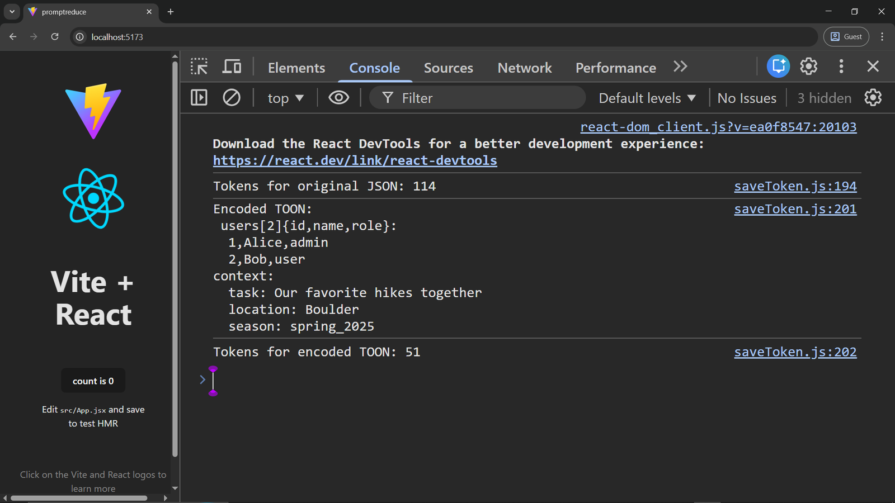
Another way to reduce token usage is TOON. Toon is a subset of JSON specifically made to reduce AI token usage.
First, install the package:
npm install @toon-format/toon
Then test token reduction:
import {GoogleGenAI,} from "@google/genai";
import { encode, decode } from "@toon-format/toon";

const ai = new GoogleGenAI({apiKey: import.meta.env.VITE_GEMINI_API_KEY});

export async function demonstrateToonEncodingDecoding() {
  const sampleData = {
    users: [
      { id: 1, name: "Alice", role: "admin" },
      { id: 2, name: "Bob", role: "user" }
    ],
    context: {
      task: "Our favorite hikes together",
      location: "Boulder",
      season: "spring_2025"
    }
  };

  try {

    const jsonString = JSON.stringify(sampleData, null, 2);
    const { totalTokens: jsonTokens } = await ai.models.countTokens({
      model: "gemini-3-flash-preview",
      contents: [{ role: "user", parts: [{ text: jsonString }] }],
    });
    console.log(`Tokens for original JSON: ${jsonTokens}`);

    const toonString = encode(sampleData);
    const { totalTokens: toonTokens } = await ai.models.countTokens({
      model: "gemini-3-flash-preview",
      contents: [{ role: "user", parts: [{ text: toonString }] }],
    });
    console.log("Encoded TOON:\n", toonString);
    console.log(`Tokens for encoded TOON: ${toonTokens}`);

  } catch (error) {
    console.error("Error demonstrating TOON:", error);
  }
}

demonstrateToonEncodingDecoding();
Check it out in the console:
This works best for a multi-purpose AI app. You can implement a routing layer to use the least powerful model for simple tasks and the most powerful model for tasks that require high reasoning or a massive context window.
You can use LLMRouter, an open-source Python library for LLM routing.
Selective retention is a context management strategy for LLM applications.
Rather than feeding an LLM the entire history of a conversation, only the most important information relevant to the conversation is fed to the LLM.
The following pseudo-code demonstrates how you can achieve this:
import { VectorDB } from 'vector-db-library';

const vectorDB = new VectorDB();

await vectorDB.add({ id: message.id, embedding: await createEmbedding(message.content) });

async function generateResponse(latestQuery) {
  const queryEmbedding = await createEmbedding(latestQuery);
  const relevantHistory = await vectorDB.search(queryEmbedding, { topK: 5 });

  const prompt = buildPrompt(systemPrompt, relevantHistory, latestQuery);
  return await model.generateContent(prompt);
}
If you want the LLM model to return its response in a specific format, you can tell the model to return its response in a specific format without wasting tokens describing it.
Below is how this can be achieved in Gemini:
const generationConfig = {
  responseMimeType: "application/json",
  responseSchema: {
    type: "object",
    properties: {
      country: { type: "string" },
      capital: { type: "string" },
    },
    required: ["country", "capital"],
  },
};
You can also use prompt optimizers such as LLMLingua.
LLMLingua is a Python package that uses a smaller model to compress prompts by removing redundant tokens while preserving their semantic meaning.
This allows you to reduce prompt size without significantly affecting the model’s understanding of the request.
According to the authors, LLMLingua can achieve up to 20× prompt compression with minimal performance loss.
When you reduce unnecessary tokens, structure outputs deliberately, and use the right tools for the task, you’re doing more than cutting costs. You’re improving latency, increasing reliability, and creating space for more advanced workflows.
This isn’t an exhaustive list of techniques for reducing token usage in LLM prompts. The ecosystem is evolving quickly, and new approaches continue to emerge. Still, the tools and formats covered in this guide, from system instructions to selective retention, offer a strong starting point for developers looking to build faster, more cost-efficient, and more scalable AI systems over time.

We tested five AI code review tools for speed, setup, security, and code quality to compare their strengths and help you choose the right tool.

Compare five React toast libraries for features, bundle size, accessibility, performance, and React 19 compatibility.
See how Tecovas built a patching agent that turns LogRocket’s Galileo AI issue analysis into GitHub PRs, with a developer reviewing every fix before it ships.

Explore OctaneJS, a compiler-first alternative to React. Build a task dashboard and learn about rendering, hooks, asynchronous UI, and React compatibility.
Hey there, want to help make our blog better?
Join LogRocket’s Content Advisory Board. You’ll help inform the type of content we create and get access to exclusive meetups, social accreditation, and swag.
Sign up now

 Learn more →