If your AI app or agent works perfectly in development but falls apart in production, you’re not alone. In a local environment, everything behaves exactly as expected. Prompts return clean results, API calls resolve on time, and workflows complete the way you designed them. But once real users and real traffic enter the picture, the flaws start to show.

Production environments expose failure modes that rarely appear during development. Model outputs become inconsistent, agents loop endlessly, user inputs break carefully crafted prompts, and context windows degrade silently while conversations grow.
In this article, we’ll walk through the five most common reasons AI applications fail under production pressure and how to fix them. You’ll learn how to design AI systems that fail gracefully, recover automatically, and handle unpredictable user behavior and operational complexity without bringing down your entire pipeline.
Traditional APIs are deterministic. LLMs are not. The same prompt sent to the same model can produce meaningfully different outputs across calls, and that unpredictability can break production systems in several ways.
Sometimes the failure is structural. You ask for JSON with specific fields and, while you usually get it, the response occasionally includes code fences, extra commentary, or an entirely different schema, like the example below:
Sure! Here's your json: { "foo": "bar" } |
Other times, the structure is valid and passes schema checks, but the values themselves are fabricated, such as a non-existent product ID, an invented date, or a subtly incorrect calculation.
Treat model output as untrusted input. Never assume the model returned what you asked for. Normalize malformed JSON before parsing it, validate the parsed result against an explicit schema, and treat validation failures as expected outcomes rather than rare exceptions.
Use the structured output features provided by your model vendor. Most modern LLM APIs now support schema-constrained responses, where you define the expected structure and the provider enforces it during generation.
For example, with OpenAI structured outputs, you can define a schema using Zod and have the API return a parsed, validated object:
import OpenAI from "openai";
import { zodTextFormat } from "openai/helpers/zod";
import { z } from "zod";

const openai = new OpenAI();

const CalendarEvent = z.object({
  name: z.string(),
  date: z.string(),
  participants: z.array(z.string()),
});

const response = await openai.responses.parse({
  model: "gpt-4o-2024-08-06",
  input: [
    { role: "system", content: "Extract the event information." },
    {
      role: "user",
      content: "Alice and Bob are going to a science fair on Friday.",
    },
  ],
  text: {
    format: zodTextFormat(CalendarEvent, "event"),
  },
});

// Fully parsed and schema-validated object
const event = response.output_parsed;
Gemini and Claude also support structured outputs. Using these features significantly reduces formatting errors. Instead of asking the model to “please return valid JSON,” you define a schema at the API level and receive a parsed object that already conforms to it. This shifts structural correctness from something you hope the model follows to something the API actively enforces.
AI applications have moved from simple prompt–response patterns to agentic workflows, and that introduces a new failure mode: the runaway agent loop.
In this scenario, the model decides it needs to call a tool. The tool returns a result. The model interprets that result, decides the answer is not complete, and calls the tool again. Or it calls a different tool to verify the first result, then a third to reconcile the two, and eventually circles back to the first. Each iteration consumes tokens, and each token costs money. In a tight loop, an agent can burn through hundreds of thousands of tokens in minutes while producing no useful output and running up a significant bill.
Every agentic loop should have a maximum iteration count. Once the limit is reached, the agent should stop, return whatever partial result it has, and explain that it could not complete the task. Here’s an example:
async function runAgent(task, tools, options = {}) {
  const { maxSteps = 10 } = options;
  const history = [{ role: 'user', content: task }];

  for (let step = 0; step < maxSteps; step++) {
    const response = await callModel({
      messages: history,
      tools,
    });

    history.push(response.message);

    // If the model didn't request a tool call, it's done
    if (!response.message.tool_calls?.length) {
      return {
        success: true,
        result: response.message.content,
        steps: step + 1,
      };
    }

    // Execute each tool call and add results to history
    for (const toolCall of response.message.tool_calls) {
      const result = await executeTool(toolCall);
      history.push({
        role: 'tool',
        tool_call_id: toolCall.id,
        content: JSON.stringify(result),
      });
    }
  }

  // Agent hit the step limit without finishing
  return {
    success: false,
    partial: true,
    result: 'Reached maximum steps without completing the task.',
    steps: maxSteps,
  };
}
In this example, the agent runs inside a bounded loop that caps the number of tool-call cycles, ensuring it cannot run indefinitely. This guardrail turns runaway behavior into a controlled failure mode, making errors predictable and observable while limiting cost and latency spikes. It also gives you a clear lever to tune the tradeoff between completeness and resource usage as your agent becomes more capable.
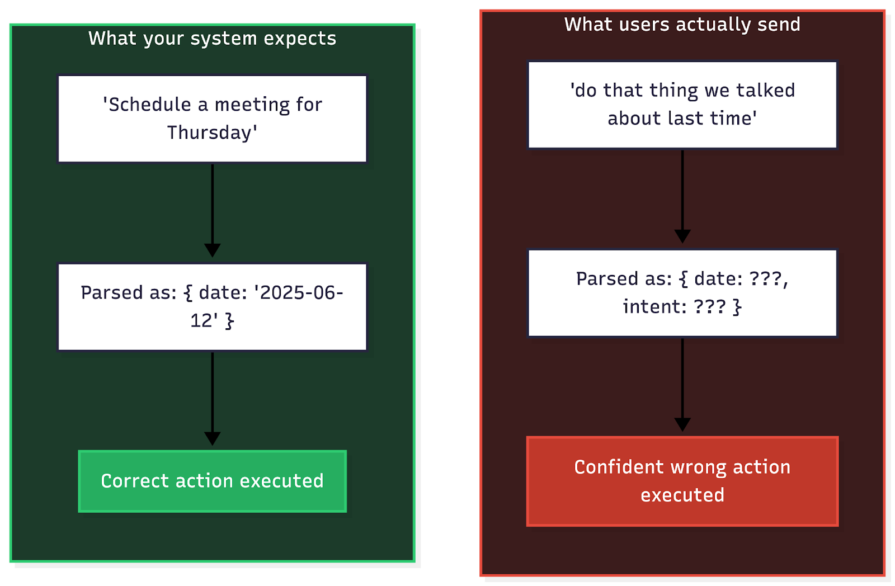
If you build prompts assuming users will provide clear, actionable instructions, your system will fail. In production, incomplete and contradictory input is the norm.
These failures typically show up in three patterns:
The image below illustrates this gap using multi-turn references as an example.
Do not feed raw input directly into your primary model. Instead, add a lightweight classification step that routes the request based on its state. The exact categories may vary depending on the type of agentic workflow you are building, but at a minimum, you should distinguish between actionable, ambiguous, incomplete, and out-of-scope requests.
async function classifyAndValidateIntent(userInput, conversationHistory) {
  // Cheap call to a smaller model (for example, gpt-4o-mini)
  const classification = await callModel({
    model: 'gpt-5.1',
    messages: [
      {
        role: 'system',
        content: `Classify request as: "clear_actionable", "ambiguous", "incomplete", or "out_of_scope".
Return JSON: { "category": "...", "missing": [...], "interpretation": "..." }`
      },
      ...conversationHistory,
      { role: 'user', content: userInput }
    ],
    response_format: { type: 'json_object' },
  });

  const intent = JSON.parse(classification.content);

  // Handle issues before they reach the expensive execution model
  if (intent.category === 'ambiguous') {
    return {
      action: 'clarify',
      message: `Did you mean: "${intent.interpretation}"?`
    };
  }

  if (intent.category === 'incomplete') {
    return {
      action: 'request_info',
      message: `I need more info: ${intent.missing.join(', ')}?`
    };
  }

  return {
    action: 'proceed',
    interpretation: intent.interpretation
  };
}
This forces the system to earn the right to act. Instead of immediately executing “do that thing we discussed,” the system first determines whether “that thing” is well defined. If the request is ambiguous, it asks a targeted clarification question. If it is incomplete, it requests the missing information. Only clear, structured intents reach the expensive execution path.
For any agentic workflow where the model can modify data or send communications, insert a human confirmation step.
async function executeAgentAction(action, context) {
  const riskLevel = assessActionRisk(action);

  if (riskLevel === 'HIGH') {
    // Require explicit user confirmation before proceeding
    return {
      status: 'pending_confirmation',
      message: `I'm about to ${describeAction(action)}. Should I proceed?`,
      confirmationToken: generateToken(action),
    };
  }

  // Low/medium risk actions can proceed with just an audit log
  await logAction(action, context);
  return executeAction(action);
}
This adds a simple safety brake. High-impact operations can no longer happen based on one ambiguous model output.
For example, instead of immediately updating a customer’s subscription tier, publishing changes to a live knowledge base article, or sending a bulk message to 5,000 users, the system can respond with, “I’m about to upgrade this account to the Enterprise plan and notify the customer. Should I proceed?” The action only executes after explicit confirmation.
Every language model has a finite context window. In development, you rarely get close to it. In production, you eventually will.
The real risk is not a hard failure. It is the gradual, silent degradation that happens as you approach the limit. As conversations expand, earlier instructions carry less weight, and the model starts ignoring constraints or contradicting information it was given only a few turns earlier.
Implement a context budget and enforce it before every model call.
Count tokens before sending a request. If the conversation history, system prompt, and injected context exceed a safe threshold, typically 60–80 percent of the model’s maximum to leave room for the response, truncate or summarize before calling the model.
You can use a tokenizer such as gpt-tokenizer to estimate how many tokens your messages will consume before making the API call:
import { encode } from 'gpt-tokenizer';

function enforceContextBudget(messages, maxTokens = 100_000) {
  let totalTokens = 0;
  const budgeted = [];

  // Always keep the system prompt
  if (messages[0]?.role === 'system') {
    totalTokens += encode(messages[0].content).length;
    budgeted.push(messages[0]);
  }

  // Add messages from most recent to oldest, stopping at the budget
  const remaining = messages.slice(messages[0]?.role === 'system' ? 1 : 0);
  const reversed = [...remaining].reverse();

  for (const msg of reversed) {
    const tokenCount = encode(msg.content || '').length;
    if (totalTokens + tokenCount > maxTokens) break;
    totalTokens += tokenCount;
    budgeted.unshift(msg);
  }

  return budgeted;
}
This ensures your system never silently exceeds a safe token threshold. Instead of unpredictable degradation, you get explicit control over what the model sees.
Rather than dropping old messages entirely, summarize them so the model retains the important facts without paying the full token cost. This preserves context quality while keeping token usage under control.
async function compressConversationHistory(messages, options = {}) {
  const { maxMessages = 20, summaryModel = 'gpt-4o-mini' } = options;

  if (messages.length <= maxMessages) return messages;

  // Split into old messages to summarize and recent messages to keep
  const systemPrompt = messages[0]?.role === 'system' ? messages[0] : null;
  const conversations = messages.filter(m => m.role !== 'system');
  const cutoff = conversations.length - maxMessages;
  const oldMessages = conversations.slice(0, cutoff);
  const recentMessages = conversations.slice(cutoff);

  // Summarize the old messages
  const summary = await callModel({
    model: summaryModel,
    messages: [
      {
        role: 'system',
        content: 'Summarize this conversation. Preserve key decisions, user preferences, specific data points, and any commitments made. Be concise.',
      },
      ...oldMessages,
    ],
  });

  const result = [];
  if (systemPrompt) result.push(systemPrompt);
  result.push({
    role: 'system',
    content: `Summary of earlier conversation:\n${summary.content}`,
  });
  result.push(...recentMessages);

  return result;
}
Summarization preserves key facts, decisions, constraints, and user preferences while significantly shrinking token usage. Instead of dropping older messages entirely, you compress them into a structured memory that retains what matters.
In traditional software, if a request fails, you retry it. In AI applications, blindly retrying a failure often makes things worse.
When an LLM call fails, the cause matters. A rate limit response, such as HTTP 429, or a timeout, such as HTTP 500, is usually transient. Waiting may fix it. But a bad output, such as a tool call with invalid arguments, is a semantic error. Retrying the exact same prompt will likely produce the exact same bad result. If you simply loop and retry, you burn tokens in a death spiral of identical failures.
Even worse, retries can pollute context. If your agent triggers an error and you automatically feed that error back into the conversation, the model may get distracted by the noise, lose track of its original goal, or start hallucinating “fixes” that introduce new bugs.
Distinguish between network errors and model errors.
Handle network glitches with exponential backoff. Handle model errors with self-correction.
If the model generates invalid output, such as a bad tool call, catch the error and return a precise correction message back to the model instead of simply retrying the same request:
You called function X with argument Y, which is invalid. The valid values are Z. Please try again. |
This gives the model the information it needs to correct itself on the next turn.
async function smartRetryModelCall(messages, maxAttempts = 3) {
  let history = [...messages];

  for (let attempt = 1; attempt <= maxAttempts; attempt++) {
    try {
      // 1. Call the model
      const response = await callModel(history);

      // 2. Validate the output
      const validation = validateOutput(response);

      if (validation.success) {
        return response;
      }

      // 3. Feed the validation error back for self-correction
      console.warn(`Attempt ${attempt} failed validation: ${validation.error}`);

      history.push(response.message);
      history.push({
        role: 'system',
        content: `Your last response was invalid: ${validation.error}. Please correct it.`,
      });

    } catch (error) {
      // 4. Retry transient network errors with backoff
      if (isTransientError(error)) {
        await sleep(Math.pow(2, attempt) * 1000);
        continue;
      }

      throw error;
    }
  }

  throw new Error('Self-correction failed after maximum attempts');
}

function isTransientError(error) {
  // 429 and 5xx errors are worth retrying
  return error.status === 429 || error.status >= 500;
}
This turns a dumb retry loop into a repair loop. The model gets better information with each failure instead of becoming more expensive with each repeat attempt.
Each strategy above addresses a specific reason AI applications fail. The real payoff comes from combining them into a single request pipeline.
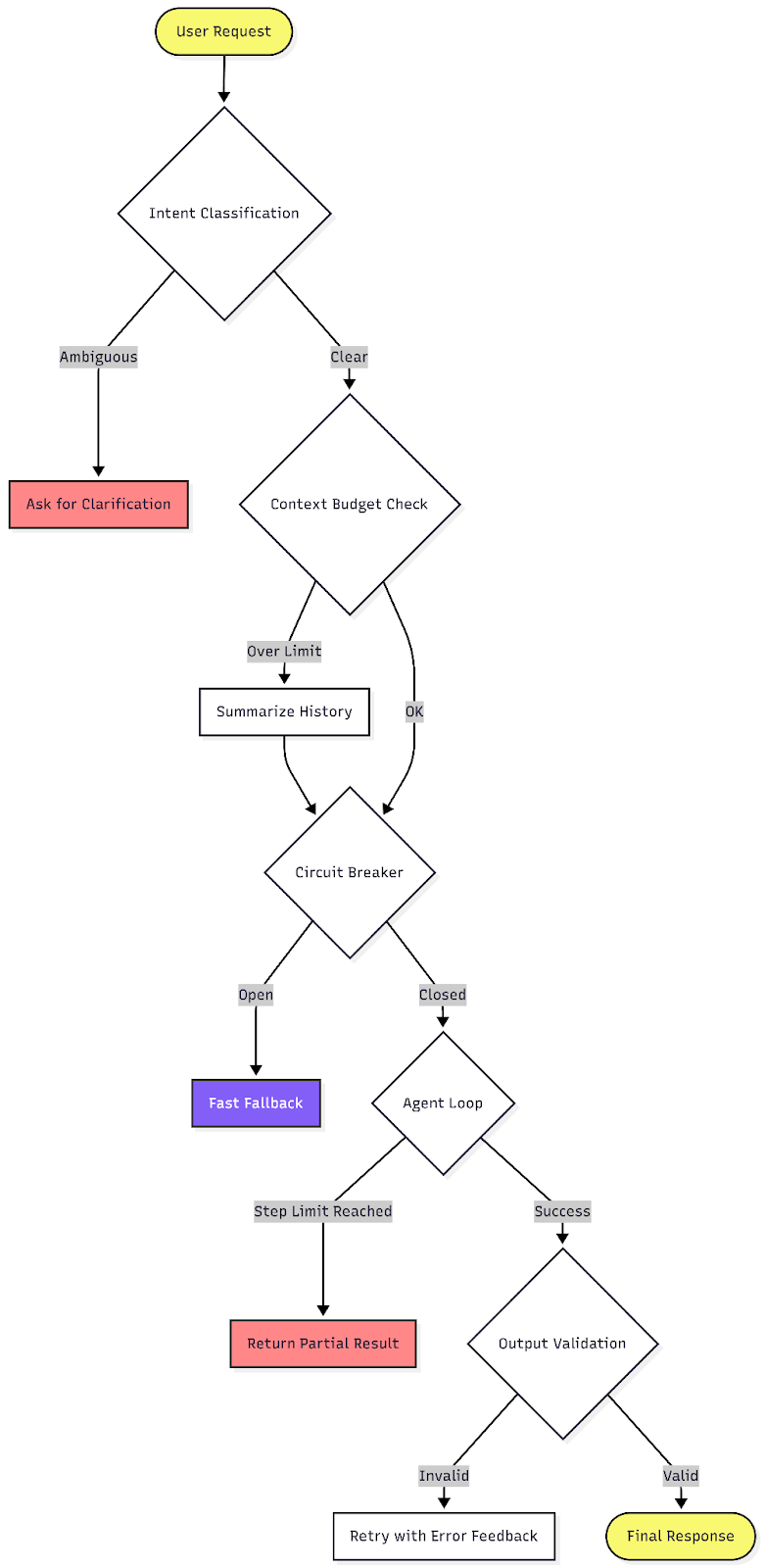
As shown in the diagram above, each request moves through a series of explicit gates before a response is returned. Ambiguous inputs are clarified, oversized context is compressed, outages are contained, agent loops are bounded, and outputs are validated before they are trusted.
Every stage has a defined fallback. Instead of crashes, runaway costs, or silent corruption, the system fails in controlled and observable ways.
AI applications fail in production because they combine the reliability challenges of distributed systems with the unpredictability of language models. You are managing latency and rate limits alongside non-deterministic outputs, runaway loops, probabilistic routing, and context windows that degrade silently. Treating the model as a trusted black box turns these failure modes into seemingly random incidents.
The solution is to wrap that black box in clear architectural constraints. Enforce behavior instead of hoping for it. Validate every output against a schema, bind every agent loop with a step counter, classify intent before execution, and apply backoff patterns to handle inevitable failures. The secret to building a resilient AI system is to apply strong engineering controls around its probabilistic components.

Compare five React toast libraries for features, bundle size, accessibility, performance, and React 19 compatibility.
See how Tecovas built a patching agent that turns LogRocket’s Galileo AI issue analysis into GitHub PRs, with a developer reviewing every fix before it ships.

Explore OctaneJS, a compiler-first alternative to React. Build a task dashboard and learn about rendering, hooks, asynchronous UI, and React compatibility.

Explore Vercel’s vgpu, a WebGPU library for AI agents. Learn to build a dynamic shader in Next.js and validate rendering output with headless testing in Node.js.
Would you be interested in joining LogRocket's developer community?
Join LogRocket’s Content Advisory Board. You’ll help inform the type of content we create and get access to exclusive meetups, social accreditation, and swag.
Sign up now

 Learn more →