
Editor’s note: This article was updated on 12 May 2022 to include information on using Git workflows to handle hotfixes.
Stop me if you’ve lived it before: you’re either a part of or are currently managing a big team of developers who don’t all work using the same tech stack. Why? Well, your team is probably comprised of backend developers working on Java or Node.js, frontend devs working on Angular, React, or Vue.js, and you may even have a couple of data scientists working in Python.
On top of that, everyone said they know how to use Git, but in reality, they don’t. They usually deal with version control using their IDE of choice, clicking options without knowing exactly what they do.
Normally, reason would dictate that these teams handle their source code separately, which means using different repositories for each codebase. That would also give them the ability to have individual development flows, independent of each other.
That being said, often luck is not on your side, and you’re left with a single repository and three different teams, trying to learn how to work together. In this particular article, I’m going to tackle this scenario, but solely from the source control point of view. In other words, how to create a useful development flow that allows everyone to work together without messing up each other’s code.
Here are some Git workflow examples that I’ll discuss:
In 2010, Vincent Driessen published a very interesting article, describing an approach to handling version control with Git in development teams.
Essentially, what that article proposed (without all of the bells and whistles, if you want all the details, go directly to the article) was that you’d:
That’s the flow, in a nutshell. There are a few other considerations when it comes to tagging and hotfixes, but I’ll let you read the original article for that.
So, just like many others, I took that approach to heart, and it works very well (in my humble opinion) with homogenous teams when they all work as one on the same code.
The problem comes, when that is no longer the reality.
And don’t get me wrong, the model still works if your team is proficient with the tool. If they know what it means to pull versus fetch from a repository, or how to deal with merge conflicts correctly, then, by all means, use this model.
Sadly, this is not the case all of the time, too many developers tend to gloss over the documentation of Git when they need to use it. This causes either minor problems when the teams are small enough or it forces them to elect teammates to take on the responsibility of doing all merges.
Maybe you’ve been there as well — you have some devs on your team that know the tool very well and understand what happens when they use it, so they tend to be the ones that handle the most complicated tasks.
For example, you might have these devs creating the feature branches at the start of the sprint and then taking care of the merges once the others deem the code ready.
This might be a setup that works in some cases, but no doubt, it’ll add a lot of responsibility to those specific individuals and it will definitely take time away from their development.
So, what’s the worst that can happen if we don’t try to adjust our Git flow?
Let me share a few examples I’ve lived through that led me to come up with a new Git workflow approach.
The flow dictates that every new branch needs to come from the main development branch, this is to avoid bringing incomplete code with us from other half-finished branches. The problem here is developers who are not paying attention when creating their branches and using another, maybe use an older branch as a source by mistake.
Now they’re trying to merge their complete code into development and, understandably, are having a lot of merge conflicts. This gets even worse if the developer just accepts their version of the code to resolve it since, in their mind, their work is the latest.
Once this is all said and done, they’ve uploaded their code, yes, but in the process, they also overwrote the newest version of the other team’s code with older, unfinished versions of it.
Let’s look at it using a very simple diagram:
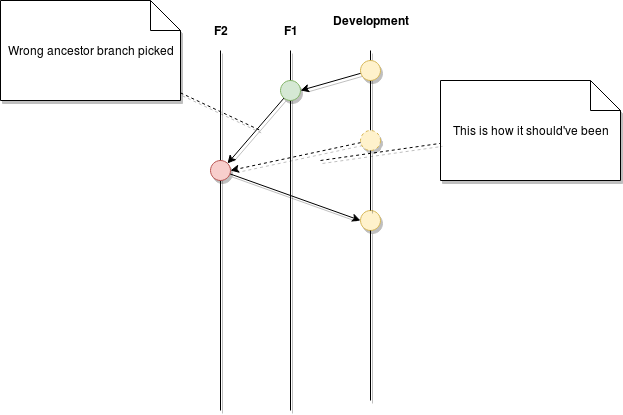
In the end, the code that gets merged from branch F2 had the unfinished code from F1. And because all teams share the same repository, F1 could have been a frontend-specific branch and the F2 could be for the backend team. Can you imagine the chaos that comes from having someone from backend messing up the code for the frontend? It’s not pretty, I can tell you.
Similar to the previous problem, if you merge into development your unfinished feature branch just to see how that would work, or (even worse) to make sure there are no conflicts, you’re essentially poisoning the main branch with your unfinished code.
The next developer that comes and creates a brand new branch from the base one, like they’re supposed to, will be carrying your code. And when they decide to merge it back, assuming you’ve already finished your code and merged it before them, they’ll be having to solve merge conflicts for your code—and not theirs! #WTF
Check out the next flow diagram showing this exact case:
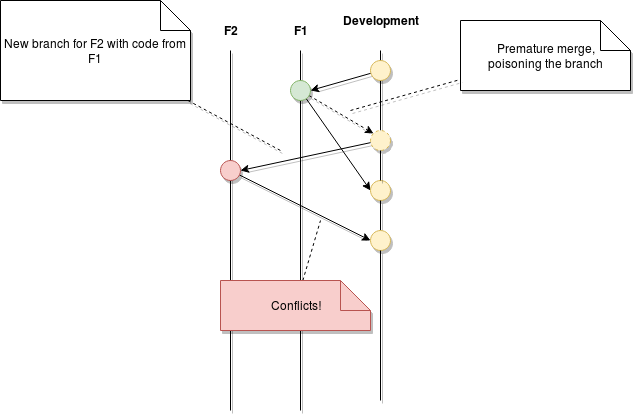
In the end, the results are the same as before, you’re affecting other people’s work without even realizing it. In fact, these problems can remain unseen until they hit production, so you need to be extra careful with the way you handle code.
There are other ways to screw up your coworkers’ code, but they are somewhat related to these two examples, and as you are probably guessing by now, the actual challenge is not with the flow itself but rather with the team.
The ultimate fix for this is training the developers involved so they don’t keep making the same mistakes, but if you can’t, or they won’t learn (after all, to err is human) the other option that you have is to adjust your flow in a way you can minimize the damage done.
What I tried to achieve with this flow was to narrow down the area of effect a mistake can have. By compartmentalizing the code into very segregated branches, if someone forgets something, or simply doesn’t want to play by the rules, they’ll only affect their immediate teammates and not the rest of the teams.
Problems are impossible to avoid, the key here is to not let them spread into other teams, because then, fixing them becomes a project-wide task, while if it’s just a frontend or backend issue, that team can take care of it on their own.
Let’s now look at how this flow would look for a two-team composition; you can easily extrapolate to any number of sub-teams inside your project:
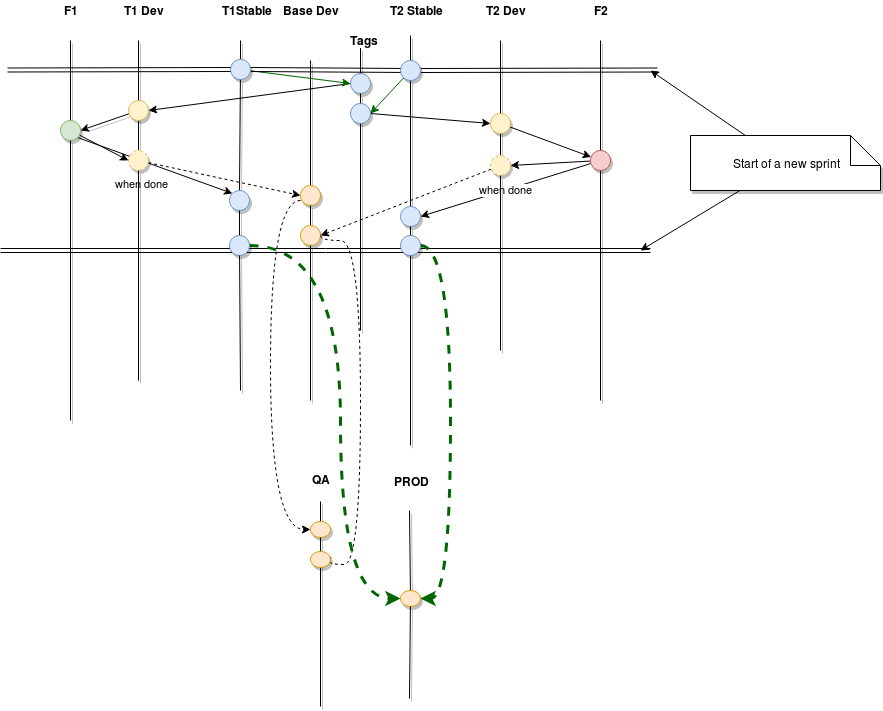
That’s a lot of lines, I know, but bear with me for a second.
The flow tries to show how two teams (T1 and T2) would work within a sprint’s worth of time, in two different features (F1 and F2).
Just so everything is clear, here are the details:
I know that sounds like a lot and might look like too much to handle, but it helps prevent a lot of disasters.
Let me explain.
Tags make sure all of your branches created within a sprint will contain the same origin code. This is very important because if you don’t, you could potentially create a new branch one week into the sprint with the content of any partial test any other teammates of yours could have merged into your team’s development branch. This basically prevents you from unwillingly promoting unfinished code from others while merging yours.
Stable branches help you in the process of promoting code into production (or possibly a step before that, UAT). You see, in an ideal world, you’d just promote your QA branch into the next environment. But in reality, there can always be carryover, either due to unfinished features, or bugged ones.
Whatever the case may be, those pieces of code are not good enough to get out of QA and into production, so when setting up the next deployment, you’ll need to hand-pick your branches, only those which got approved. This way, you already have a branch for each team that is already pre-approved, so all you have to do is merge these branches into production and you’re ready.
Individual development branches (T1Dev and T2Dev in the example above) help isolate the code. You see, merging code into these branches needs to be done by the developers themselves and, as we discussed at the start of this article, you can’t always trust in their ability to do so correctly. By having individual development branches, you make sure that if they make any mistakes, they will only affect their team and not the entire project.
Depending on the size of the features, you might need to create several individual branches from your feature branch. You might structure your local development workflow however you see fit, just remember one thing: anything you do needs to come from and go into the feature branch, that’s it.
When you’re in a situation where there is an urgent bug fix, the best course of action is to create a hotfix branch. This branch is usually created from the master branch or a stable release branch. When the application is patched it will be merged back into the master or main branch, which represents the linear release timeline of the application.
Here’s the thing with hotfixes, while active development ceases after the release date, the production branch is still being updated by bug fixes.
Here are some tips to keep in mind when setting up a Hotfix workflow:
A hotfix branch allows a team to continue working on the development or feature branch, while another team is busy fixing the bug. If a developer tries to merge their feature branch to development and there are merge conflicts, there’s a small chance that they might accept their own changes and accidentally revert the bug fix. Therefore, all feature branches should be periodically updated with the development branch to ensure that the latest code gets shipped back to the development branch.
Here are a few more recommendations outside of the flow. Although the flow by itself will help limit the area of effect of any unintentional mistake your team or teammates can make, there are other recommendations that go hand-in-hand with it and can help prevent them even more.
Development flows need to be documented, especially complex ones. Everyone needs to be able to understand exactly what needs to happen when, and more importantly how to do it.
In other words, don’t be afraid to write foolproof documents, that lead the developers by the hand. It might sound like a lot, but you’ll write it once and use it often, especially at the start of your project and with every new dev joining it afterward.
Having step-by-step descriptions helps them to avoid guessing how to perform pulls or merges, and gives them a standardized way of handling those tasks, that way if there is any doubt, anyone will be able to answer it.
Another form of documentation is face-to-face Q&As when possible, or at least over hangouts or any other type of live gathering of members, where everyone can voice their doubts.
Sometimes those doubts will highlight flaws in your plan so, on the flip side, be open to changes.
Just like they need to be open to following your lead (if you’re the one crafting the flow), you need to be open to possible overlooks on your part, or even improvements you’ve missed. Be aware these things can happen, and try to review the plan with the members of your team that are more versed in Git before releasing it to everyone. If they’re OK with it, there’s a very good chance, everyone else will be too.
Again, sometimes problems come from freedom of action. If the developers working with Git don’t really understand how it works but try to compensate for that by using external tools, they might end up causing more trouble than they would without the tools.
In an effort to avoid this, feel free to enforce the Git client they need to use, the environment they need to work on, the folder structure, or whatever you feel might simplify their tasks in regards to handling source control. I wrote an article on the kind of standards you’d benefit from implementing, in case you’re interested in knowing more about this subject.
One of my go-tos here is enforcing the use of CLI client that comes with inbuilt Git, and then list, in the step-by-step documentation every command they need to enter. This way, the task becomes a no-brainer for everyone (which is the ideal scenario, having your devs worry about lines of codes, not lines of Git).
That’s it for this article; thanks for reading up to this point, and remember:
Thanks again for reading. If you’d like, please leave a comment with similar stories on what kind of problems have you encountered in the past due to the misuse of Git, or different flows you used to avoid them.
Until the next one!
Install LogRocket via npm or script tag. LogRocket.init() must be called client-side, not
server-side
$ npm i --save logrocket

// Code:

import LogRocket from 'logrocket';
LogRocket.init('app/id');
// Add to your HTML:

<script src="https://cdn.lr-ingest.com/LogRocket.min.js"></script>
<script>window.LogRocket && window.LogRocket.init('app/id');</script>

Learn how to set up Meilisearch, index documents, and build keyword, semantic, and hybrid search with AI-powered retrieval.
Compare pnpm and npm across security defaults, disk usage, dependency strictness, and workspace policy to decide which package manager fits your project.

I migrated 20 production-style components from Tailwind to StyleX. Here’s what the data showed about LOC, CSS bundle size, build time, and type safety.

A guide for using JWT authentication to prevent basic security issues while understanding the shortcomings of JWTs.
Hey there, want to help make our blog better?
Join LogRocket’s Content Advisory Board. You’ll help inform the type of content we create and get access to exclusive meetups, social accreditation, and swag.
Sign up now


 Learn more →





