UX design evolves toward building the best digital product that precisely matches varying user expectations, while also achieving optimal productivity and efficiency. During this never-ending UX evolution, designers adapt to various design techniques to improve UX. AI is one of the trending UX enhancement techniques that every modern product design team tends to use.
There are five different AI-powered design patterns that designers can use to improve the UX of any software product: predictive design, generative assistance, adaptive personalization, background automation, and conversational interfaces. All these design patterns can effectively improve UX by reducing user interactions and simplifying UIs with AI-powered automation and personalization. Optimal, ethical, effective AI features in digital products drastically improve UX, but incorrect, suboptimal, or AI-overused integrations can ruin UX too, so integrating AI for your product should be done in a balanced way with proper research.
In this article, we’ll discuss how to make your product AI-driven or AI-assisted to improve UX with five AI-UX design patterns. We’ll also discuss common pitfalls in AI-powered feature integration, some important FAQs, and balancing non-AI vs. AI UX factors.
With AI, especially with generative AI models, you can build various digital product feature enhancements and even make unique AI-driven features; however, all these AI intrations can be categorized into the following generic AI-UX design patterns:
Users usually have to follow a specific pre-defined user flow with various interaction points to achieve a goal. Sometimes, each interaction point involves entering text via the keyboard or finding a particular UI element within hierarchical UI layers. What if we predict the user’s intention and automatically suggest or perform the next interaction for the user using AI? This is the core principle of predictive UX.
Predictive UX is an AI-UX design pattern that implements AI-powered automation to skip several user interaction points in a user flow. Predictive UX usually suggests the next user interaction by studying how the user behaved with the particular action in the past, using the user’s interests, and generic factors like what’s trending now. Predictive UX in modern products is mostly implemented with auto-completions and suggested action elements.
Here are some examples of predictive UX and how they automate user manual flows to improve UX:
| Example | AI-UX-less, manual interaction |
| An intelligent auto-complete search box in an ecommerce product that ranks suggestions based on recent searches, past purchases, location, popularity, etc. | Inspecting categories, browser history, purchase history, or scrolling through results by entering a general search term |
| Displaying the next word or phrase while typing a message in a communication app, e.g., Smart Compose in Gmail | Typing the message manually |
| Using AI-powered action summarization in text inputs, e.g., GitHub autofills the commit message by analyzing code changes with AI | Typing the action summary manually |
| Suggesting quick reply messages for an incoming message in a general messaging app | Typing short replies manually |
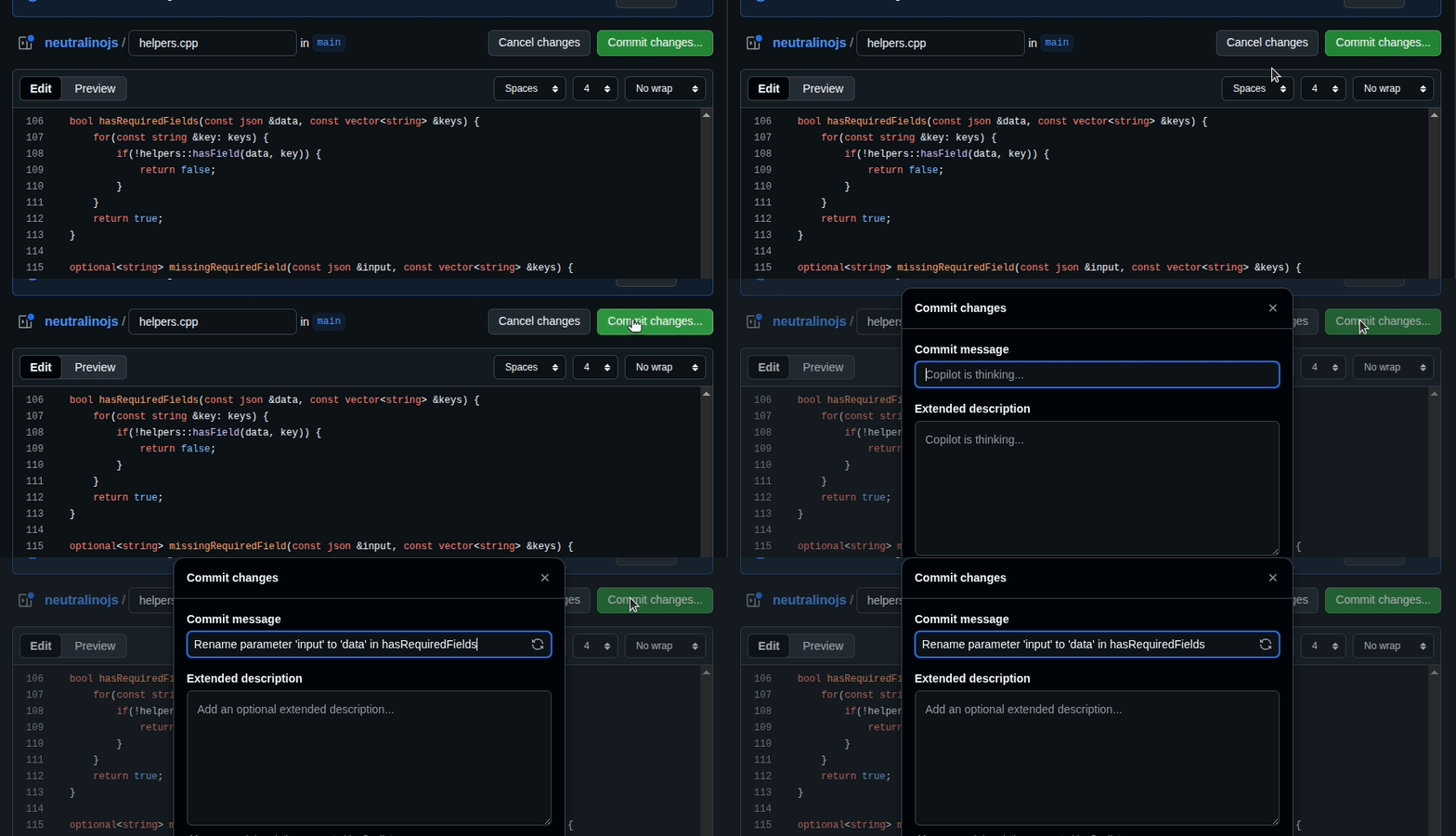
Predictive UX reduces user interaction points and shortens user flows by minimizing the required keystrokes, screen taps, or mouse actions. Predictive UX automates user interactions with user consent and helps users reach their goals faster, boosting the overall productivity in the digital product interface.
Unlike traditional UX automation, predictive UX uses AI to optimally predict the next interaction by studying the user behavior, so AI-powered predictive UX becomes a key, modern UX enhancement strategy.
We mostly perform various data-oriented operations in general digital products by tapping UI elements on mobile screens or clicking or activating UI elements with the mouse or keyboard. However, in some scenarios, we’ll have to create content or imagery by spending some time playing with the keyboard or uploading/creating imagery. For example, if you are going to create a social media post in a classic social media app, you’ll have to write the post and upload a suitable image yourself. What if the app automates creating the whole post with AI based on your requirements? That’s the impressive generative assistance!
Generative assistance is an AI-UX design pattern that uses generative AI to automatically create or co-create content, imagery, or other in-app structures based on AI prompts.
Here are some examples of generative assistance and how they automate manual user flows to improve UX:
| Example | AI-UX-less, manual interaction |
| Automatically generating a suitable thumbnail while uploading a video to a video-sharing platform | Creating a video thumbnail using a graphic design tool and uploading it along with the video |
| Generating a social media post content based on a short prompt like “Introduce my new book, Inside Computers, for university students” | Writing the social media post manually using the keyboard or a speech-to-text tool |
| Generating a high-fidelity prototype for a specific product design using an AI prompt like “A high-fidelity design for a simple travel app” in a UI design tool, e.g., designing with Uizard Autodesigner | Creating the design prototype manually with UI design features in the UI design tool |
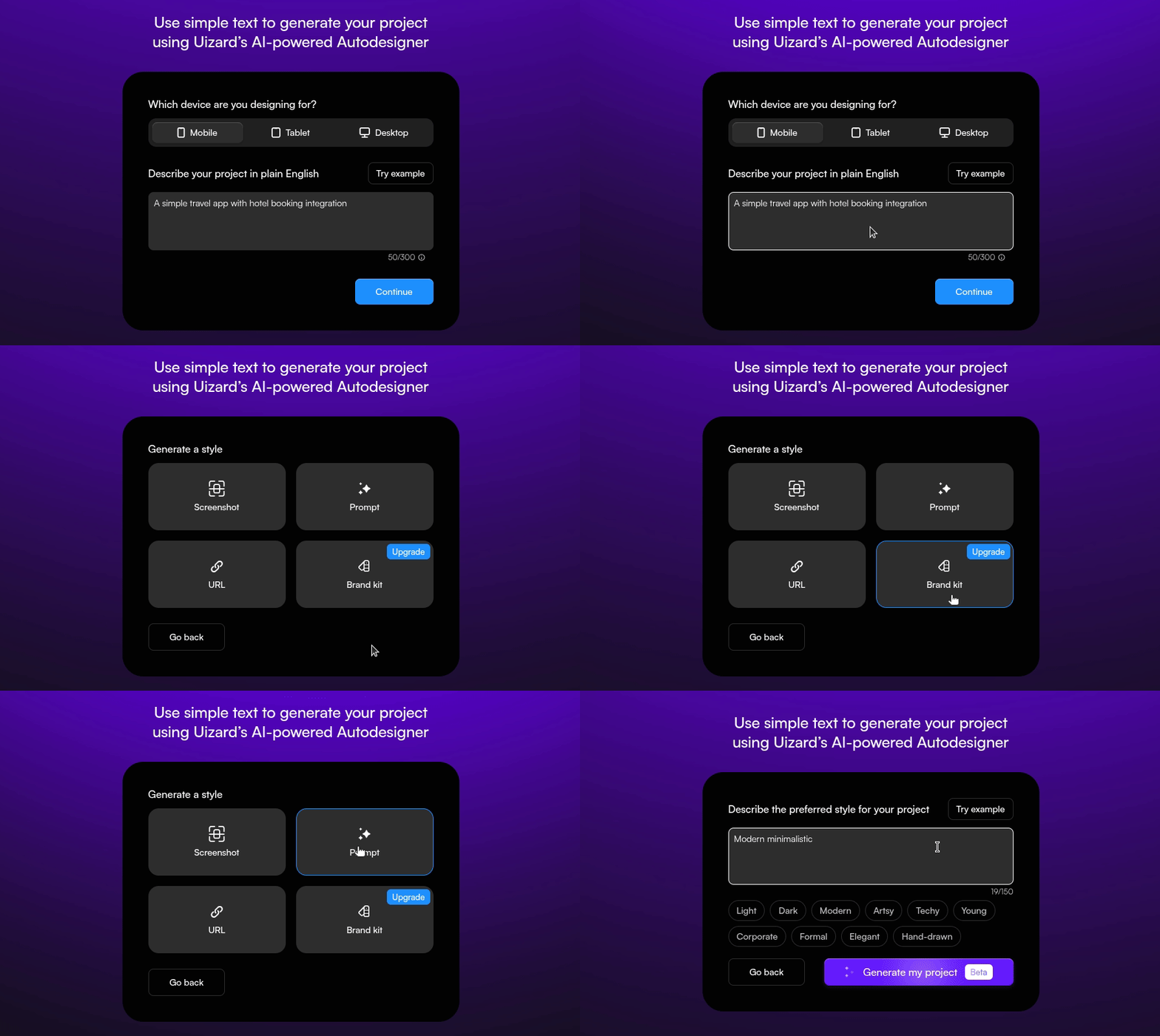
We can either let generative AI create everything instantly with a preferred prompt or collaboratively create things with AI following a step-by-step AI-human co-creation process. We should choose the right approach for the right scenario to satisfy all users, avoiding generative AI lock-in:
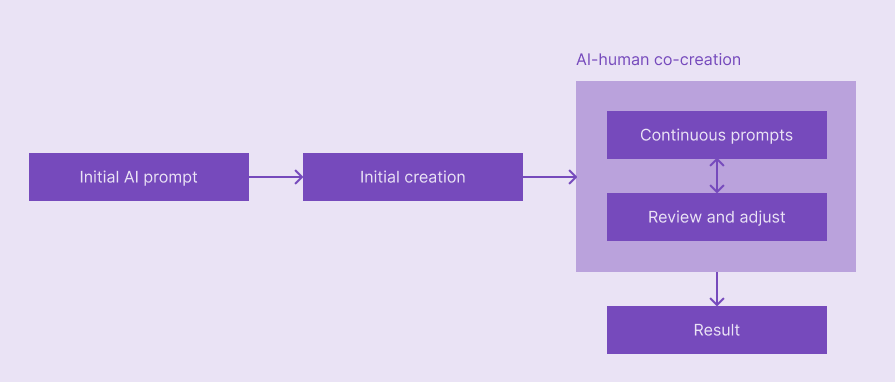
Most modern products use initial AI creation and multiple AI co-creation cycles to improve user productivity while caring about user control, accuracy, creativity, and innovation:
In UX design, personalization refers to dynamically adjusting the content, features, and behavior of a digital product based on the user. Before AI’s involvement in UX, designers implemented personalization in a simple, old-fashioned way; they used pre-configured user preferences and past data records to implement basic personalization. Now, personalization has evolved with AI, and modern designers use adaptive personalization for enhanced user satisfaction and user engagement.
Adaptive personalization implements an AI-driven continuous learning technique using user data, usually preferences, past interactions, device information, location, etc., to tailor an effectively personalized content, features, and behavior for each unique user. With this continuous user study, adaptive personalization outsmarts the traditional personalization with highly dynamic, real-time hyper-personalization.
Here are some examples of adaptive personalization and how they improve UX:
| Example | How UX is improved | AI-UX-less personalization |
| A video-sharing platform that recommends videos based on recently watched videos, search queries, subscriptions, and other personal preferences of the user | Lets users instantly watch videos they wish to watch next | Traditional subscription-based, or category/tags-based suggestions that contain more generalized, vague video selections |
| Automatically updating filter tags based on the current interests to implement smart result filtering, e.g., the personalized video tags section of YouTube | Helps users narrow down suggestions based on a specific interest | Users either have to deal with the whole suggestions list or use simple, pre-defined tags that won’t effectively narrow down the suggestions list |
| Creating music playlists with AI-powered music curation to discover favorite music every time, e.g., playlists in the Spotify app | A new, efficient, engaging, and fully automated way to discover music with less user interaction | Users will have to curate auto-created playlists often by removing songs or searching for their favorite songs manually |

Adaptive UX and adaptive personalization look like very similar concepts, but they have different scopes, techniques, and goals. Both strategies dynamically change digital product interfaces for better UX, but they differ as follows:
Product design teams use various UX principles and enhancement strategies to solve complex problems with simple product interfaces. However, some products naturally grow complex due to the domain complexity and unavoidable user requirements. As a result, users often have to follow long user flows in such products. A conversational interface is an effective solution to fix excessive time consumption in these complex products.
A conversational interface lets users automatically perform user flows by communicating with an AI agent. Since the underlying AI models are pre-trained with all user flows and have generative AI-based conversational capabilities, conversational interfaces use smart defaults and AI-generated content to accomplish automations as humans perform the same task manually by interacting with the UI.
Here are some examples of conversational interfaces and how they improve UX:
| Example | How UX is improved | AI-less, manual interaction |
| A conversational interface within a code editor that automates programming activities, like coding, system configuration, repository management, handling deployments, and testing, e.g., the Cursor AI code editor’s agent | Programmers can save time by skipping various interactions, and beginners can learn how manual interactions usually done by looking at action previews and status messages | Programmers have to spend time manually performing required interactions, sometimes repetitively |
| An AI support staff agent that helps users browse existing knowledgebase articles and answers questions based on pre-trained Q&A knowledge | Users can instantly browse knowledge base articles and find answers by using AI prompts | Users have to search the knowledge base manually, post new questions, and wait til experts reply |
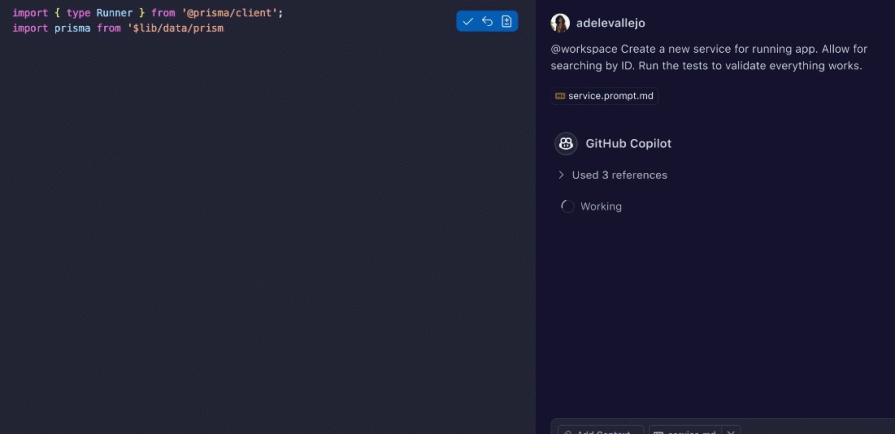
Conversational interfaces use chatbot implementations and may enable voice interaction support, so users can naturally communicate with them to accomplish tasks, skipping manual mouse/keyboard/screen interactions. Conversational interfaces, usually chatbots pre-trained with user flow knowledge, fit into AI-UX design as a secondary user interaction option — users who prefer conversational interaction can use it, and others can use the primary interaction method.
A sole conversational interface that only offers a chatbot or voice assistant won’t deliver a digital product for the current UX design era, but integrated chatbots and voice support in a well-designed digital product can become a better secondary interaction, especially for complex products and domains, to boost productivity and improve learnability.
A digital product can have various long-running background operations apart from instant actions initiated from the frontend. These background operations can be triggered by user interactions, external events, or internal app schedulers. Background operations help users reduce UI/UX complexity by shifting UI features into background operations. AI intervention further improves the UI-feature-to-background-operation conversion.
In AI-UX design, background automation refers to using AI with traditional automation concepts to reduce user interaction requirements further. AI-powered background automation only notifies the user at completion, failure, or to ask the user’s consent, and doesn’t typically ask for intermediate user inputs or require excessive configurations.
Here are some examples of background automation and how it improves UX:
| Example | AI-less, manual interaction |
| A photo storage app that automatically creates collages, animations, and highlight videos, and notifies the user at the end of creation to ask the user’s consent to save or discard | The user will have to create media types manually |
| An AI-driven personal finance app that creates monthly expense reports based on bill photo uploads using background AI OCR operations | The user has to enter expenses manually by analyzing bills |
| A video/audio conference app that creates a summary and video highlights (e.g., product demo highlights) and sends it to all participants at the end of each conference | Participants either have to write a summary manually or upload the recorded video to a third-party AI-powered video analyzer to receive AI-generated summaries |
Using personalization and background automation together creates better results that won’t require late adjustments, but some products still offer a secondary UI-driven feature for adjustments to respect user control. e.g., re-selecting photos manually of an auto-generated photo animation in photo storage apps
AI helps build fully automated background tasks with zero user interactions, so designers can shift UI-driven features into background tasks and present only results or ask for user consent eventually. AI-driven background automation improves UX by reducing visual complexity by turning interaction-oriented features into automated ones. This not only improves UX but also surprises users with futuristic AI capabilities and improves the company’s reputation.
Understanding and avoiding the following AI integration pitfalls will help you get the best benefits from AI without affecting the core UX of your product:
Here are some common questions that most designers think about while improving UX with the above AI-UX design patterns:
This usually depends on how effectively AI automates specific user flows and atomic user actions in your digital product. A product can be AI-driven if AI can create accurate, high-quality results without much human intervention, and a product should be AI-assisted if it requires frequent human intervention. However, most products still use an AI-assisted approach since the current stage of AI has accuracy issues, creativity, and innovation limitations.
Designers should design AI-UX interfaces by keeping AI ethics in mind:
You can read more about AI ethics from this comprehensive article.
Apart from the above general AI ethics, using better, well-trained AI models to create more accurate and effective results, and building a realistic self-learning mechanism are product-development-related considerations for a trustworthy AI-powered product.
Yes, AI is just a technique to improve UX. In traditional UX process phases, designers need to be knowledgeable about the AI’s feasibility and AI-UX patterns.
No, but most modern products use maximalist and futuristic sci-fi design concepts within their minimalistic designs by preparing the foundation for the next UI/UX design era.
An accurate, context-aware, ethical AI integration that optimally suggests things, creates content, or automates, aligning well with user expectations
Modern AI, especially generative AI, is still in development and has known fundamental accuracy and creativity issues, so we cannot build fully AI-based products yet for all product domains and ignore traditional user interactions. Moreover, the way that operating systems and devices are supposed to be used also prevents us from entering a fully AI-powered product era, where AI agents do all the work in the background, and ask only mandatory inputs via conversational interfaces or voice.
Overusing AI-UX patterns can reduce user control and overall product quality due to AI’s fundamental issues, and can ruin your product’s UX. On the other hand, by avoiding AI-powered UX, you won’t be able to compete in the modern software market by satisfying evolved user expectations. So, balancing non-AI UX and AI-powered UX is mandatory.
Here is how UX changes with how much AI is used in a general product:
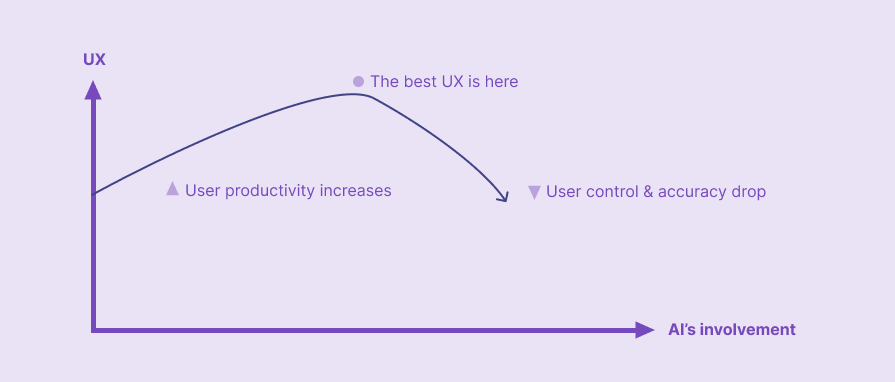
With AI’s involvement, UX grows because of the productivity boost, comes to a peak, and falls rapidly due to user control and accuracy issues. You should aim to find the peak where the best UX exists by balancing how much AI is involved in your digital product.
In this article, we discussed five AI-UX design patterns and how to use them in your digital products to improve UX. UI/UX design evolves with AI innovations, and user expectations also change, so we have to continuously improve our products to survive in the modern software development industry. The AI-UX patterns discussed in this article help you design new products or upgrade existing ones for the evolved UX design era, where AI plays a key role in user engagement and productivity enhancements. The future digital product design will motivate us to create intelligent products that understand the whole user base, and primarily focus on improving user productivity and boosting organizational revenue through increased user engagement.
Using more AI doesn’t guarantee optimized UX — with AI-UX increments, UX grows, reaches a peak, and falls rapidly, so optimized UX is all about carefully balanced non-AI UX and AI UX.
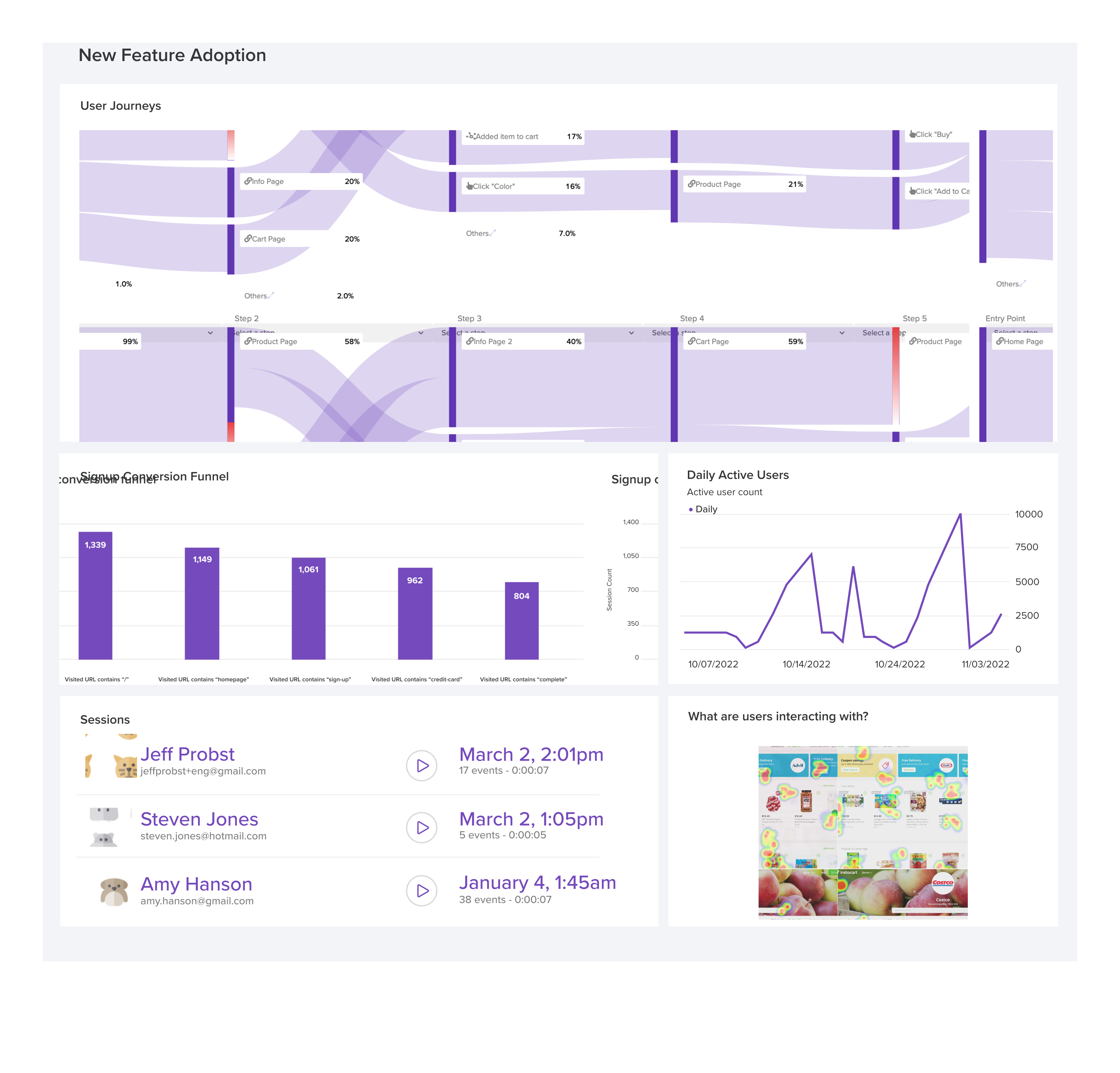
LogRocket's Galileo AI watches sessions and understands user feedback for you, automating the most time-intensive parts of your job and giving you more time to focus on great design.
See how design choices, interactions, and issues affect your users — get a demo of LogRocket today.

User stories help UX designers turn research into better design decisions. Learn what makes UX user stories different from Agile user stories, how to write them from user research, and what strong UX-focused stories look like.

When AI made generating design concepts almost effortless, I realized the most valuable part of a critique was no longer the interface itself. It was understanding the context, tradeoffs, and judgment behind the final design. Here’s how AI has changed the way I run design critiques—and why I think that’s making them better.

The Double Diamond design process helps UX teams balance exploration with decision-making, guiding projects from problem discovery to solution delivery. Learn how each phase works, which tools to use, when the reverse Double Diamond makes sense, and why the framework remains relevant for modern product development.
Explore the core principles of GUI design and learn how consistency, simplicity, feedback, accessibility, and user testing contribute to better digital experiences.



 Learn more →