useEffect breaks AI streaming responses in React
If you have ever streamed an LLM response into a React chat UI and seen text flicker, jump between messages, or land in the wrong place, the problem is usually not React itself. The problem is where you put ownership of the stream.

The useEffect Hook is useful when a component needs to synchronize with an external system after render. It is much less useful when the external system is the one driving updates on its own schedule. AI streaming responses, WebSockets, workers, and collaborative state all fall into that second category.
That distinction matters because LLM streams do not wait for React. Tokens arrive whenever the model produces them. If your component is reading the stream directly and calling setState on every chunk, you are asking React to reconcile a high-frequency external data source that it does not control.
In this article, you’ll build the broken version first, see exactly why it fails, and then fix it with TanStack AI by moving stream ownership outside React. The goal is not just to patch one chat demo. It is to adopt the right mental model for any data source that pushes updates into your app.
Feel free to clone the repo for this demo.
We’ll start with the simplest possible chat UI using the pattern you still see in many demos: fetch in the component, read the stream in a loop, and call setState as chunks arrive.
Spin up a new Next.js app:
npx create-next-app@latest useeffect-breaks
cd useeffect-breaks
Pick App Router and Tailwind when prompted. Then add your OpenRouter key to .env.local:
OPENROUTER_API_KEY=sk-or-v1-...
OpenRouter gives you access to multiple models through one API key. In this example, we use anthropic/claude-3.7-sonnet with reasoning enabled so there is a noticeable delay before the visible response starts. That gives us a clean window to interrupt the first request with a second one and trigger the race condition.
Create the API route at app/api/chat-broken/route.ts:
// app/api/chat-broken/route.ts
export async function POST(req: Request) {
  const { messages } = await req.json();

  const upstream = await fetch("https://openrouter.ai/api/v1/chat/completions", {
    method: "POST",
    headers: {
      Authorization: `Bearer ${process.env.OPENROUTER_API_KEY}`,
      "Content-Type": "application/json",
    },
    body: JSON.stringify({
      model: "anthropic/claude-3.7-sonnet",
      messages,
      stream: true,
      reasoning: { effort: "high" },
    }),
  });

  const reader = upstream.body!.getReader();

  const slowed = new ReadableStream({
    async pull(controller) {
      const { done, value } = await reader.read();
      if (done) {
        controller.close();
        return;
      }
      controller.enqueue(value);
      await new Promise((r) => setTimeout(r, 50));
    },
  });

  return new Response(slowed, {
    headers: { "Content-Type": "text/event-stream" },
  });
}
Two details matter here.
First, reasoning: { effort: "high" } makes the model spend time thinking before it emits visible answer tokens. Second, the wrapper ReadableStream adds a 50ms delay between chunks so the bug is easy to reproduce on a fast connection.
Now create the client component:
// app/broken/page.tsx
"use client";

import { useState } from "react";

type Message = {
  role: "user" | "assistant";
  content: string;
  thinking?: string;
};

export default function BrokenChat() {
  const [messages, setMessages] = useState<Message[]>([]);
  const [input, setInput] = useState("");
  const [isLoading, setIsLoading] = useState(false);

  async function sendMessage() {
    if (!input.trim()) return;

    const userMsg: Message = { role: "user", content: input };
    const newMessages = [...messages, userMsg];
    setMessages(newMessages);
    setInput("");
    setIsLoading(true);

    const res = await fetch("/api/chat-broken", {
      method: "POST",
      headers: { "Content-Type": "application/json" },
      body: JSON.stringify({ messages: newMessages }),
    });

    const reader = res.body!.getReader();
    const decoder = new TextDecoder();
    let assistant = "";
    let thinking = "";

    setMessages((prev) => [...prev, { role: "assistant", content: "", thinking: "" }]);

    while (true) {
      const { done, value } = await reader.read();
      if (done) break;
      const chunk = decoder.decode(value);
      for (const line of chunk.split("\n")) {
        if (!line.startsWith("data: ")) continue;
        const payload = line.slice(6);
        if (payload === "[DONE]") continue;
        try {
          const parsed = JSON.parse(payload);
          const delta = parsed.choices?.[0]?.delta;
          if (!delta) continue;

          thinking += delta.reasoning_content ?? "";
          assistant += delta.content ?? "";

          setMessages((prev) => {
            const copy = [...prev];
            copy[copy.length - 1] = { role: "assistant", content: assistant, thinking };
            return copy;
          });
        } catch {}
      }
    }

    setIsLoading(false);
  }

  return (
    <div className="max-w-xl mx-auto p-6">
      {messages.map((m, i) => (
        <div key={i} className={m.role === "user" ? "text-right" : "text-left"}>
          {m.role === "assistant" && m.thinking && (
            <div className="text-xs text-gray-400 italic mb-1">
              <strong>thinking:</strong> {m.thinking}
            </div>
          )}
          <strong>{m.role}:</strong> {m.content}
        </div>
      ))}
      <div className="flex gap-2 mt-4">
        <input
          className="flex-1 border rounded p-2 text-gray-900"
          value={input}
          onChange={(e) => setInput(e.target.value)}
        />
        <button onClick={sendMessage} className="bg-black text-white px-4 rounded">
          Send
        </button>
      </div>
    </div>
  );
}
This version looks reasonable at first glance. You keep the whole chat history in component state, append a placeholder assistant message, then fill that message in as the stream arrives.
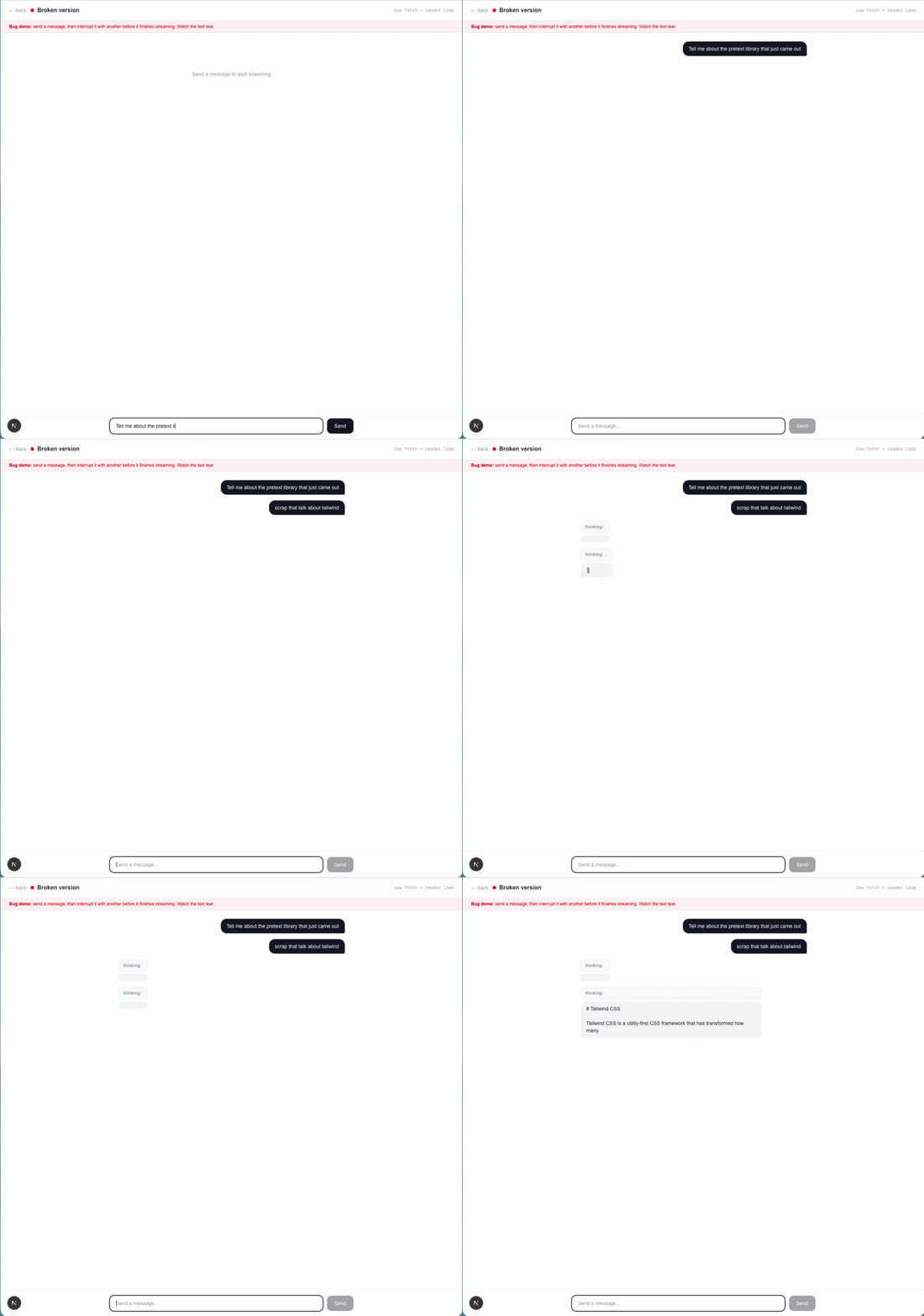
It even works in the happy path. Run npm run dev, open /broken, and send tell me about LogRocket. You’ll see reasoning tokens first, then the visible answer.
Now break it.
Send count from 1 to 30, one per line, slowly. While the model is still reasoning, send a second message like actually, list the first 20 prime numbers instead.
Once you interrupt the first request, the bug becomes obvious: both streams are still alive, both loops are still calling setMessages, and both are trying to write into what they think is the current assistant message.
That produces three separate failures.
copy[copy.length - 1] no longer points to the message the first loop started updatingThat last part is the key insight. The issue is not that React is slow. The issue is that React is being asked to reconcile two competing external timelines inside component state.
The GIF above shows all three failures at once: stale closures, overlapping readers, and conflicting writes into the same UI slot.
The article title is intentionally provocative, but the deeper problem is not that useEffect is inherently bad. It is that React effects are designed for synchronization after render, while streaming data sources produce updates whenever they want.
That mismatch is easy to miss in a chat demo because the first request usually works. The failure only appears when you add interruption, cancellation, retries, overlapping requests, or any other behavior you would expect in a real product.
Once you cross that line, the stream needs an owner. That owner should track the active request, manage cancellation, buffer chunks, and decide which message a chunk belongs to. React should subscribe to the result, not own the transport itself.
The clean fix is to move stream ownership out of the component.
Instead of letting the component own the fetch, the reader, the abort logic, and the message buffering, we put that work in a library designed for streamed chat state. React then subscribes to the current message state and re-renders when it changes.
That’s the model TanStack AI gives you.
You could build the same pattern yourself with an external store and useSyncExternalStore, but TanStack AI already packages the hard parts: streaming transport, typed message parts, cancellation hooks, and provider adapters.
Install the packages:
npm install @tanstack/ai @tanstack/ai-react @tanstack/ai-openrouter
Now create app/api/chat-fixed/route.ts:
// app/api/chat-fixed/route.ts
import { chat, toServerSentEventsResponse } from "@tanstack/ai";
import { openRouterText } from "@tanstack/ai-openrouter";

export async function POST(req: Request) {
  const { messages } = await req.json();

  const stream = chat({
    adapter: openRouterText("anthropic/claude-3.7-sonnet"),
    messages,
    modelOptions: { reasoning: { effort: "high" } },
  });

  return toServerSentEventsResponse(stream);
}
This route is much smaller, but the bigger win is conceptual.
chat() returns a normalized stream of chunks instead of making you parse provider-specific streaming details by hand. toServerSentEventsResponse() turns that stream into an SSE response that the client hook can consume directly. You stop writing stream plumbing in your UI layer and start treating it as transport.
Now the client:
// app/fixed/page.tsx
"use client";

import { useState } from "react";
import { useChat, fetchServerSentEvents } from "@tanstack/ai-react";

export default function FixedChat() {
  const [input, setInput] = useState("");

  const { messages, sendMessage, isLoading, stop } = useChat({
    connection: fetchServerSentEvents("/api/chat-fixed"),
  });

  async function handleSend() {
    if (!input.trim()) return;
    const msg = input;
    setInput("");

    if (isLoading) {
      stop();
      await new Promise((r) => setTimeout(r, 0));
    }

    sendMessage(msg);
  }

  return (
    <div className="max-w-xl mx-auto p-6">
      {messages.map((m) => (
        <div key={m.id} className={m.role === "user" ? "text-right" : "text-left"}>
          {m.role === "assistant" &&
            m.parts.map((part, i) =>
              part.type === "thinking" ? (
                <div key={i} className="text-xs text-gray-400 italic mb-1">
                  <strong>thinking:</strong> {part.content}
                </div>
              ) : null
            )}
          <strong>{m.role}:</strong>{" "}
          {m.parts
            .filter((p) => p.type === "text")
            .map((p) => (p.type === "text" ? p.content : ""))
            .join("")}
        </div>
      ))}
      <div className="flex gap-2 mt-4">
        <input
          className="flex-1 border rounded p-2 text-gray-900"
          value={input}
          onChange={(e) => setInput(e.target.value)}
        />
        <button onClick={handleSend} className="bg-black text-white px-4 rounded">
          Send
        </button>
        {isLoading && (
          <button onClick={stop} className="bg-red-500 text-white px-4 rounded">
            Stop
          </button>
        )}
      </div>
    </div>
  );
}
The biggest change is not the hook API. It is the ownership model.
useChat() gives the component a current view of chat state plus a few actions like sendMessage() and stop(). The component renders messages, but it no longer owns the stream loop itself.
That matters because the message structure is richer and more stable. Each message has an id, and each message is split into typed parts like text, thinking, and tool-related chunks. That gives the stream layer enough structure to manage updates without forcing your component to stitch everything together manually.
The interruption path is also cleaner. In handleSend(), calling stop() ends the in-flight request before you start the next one. The small await new Promise((r) => setTimeout(r, 0)) gives the cancellation a chance to settle before the replacement request begins.
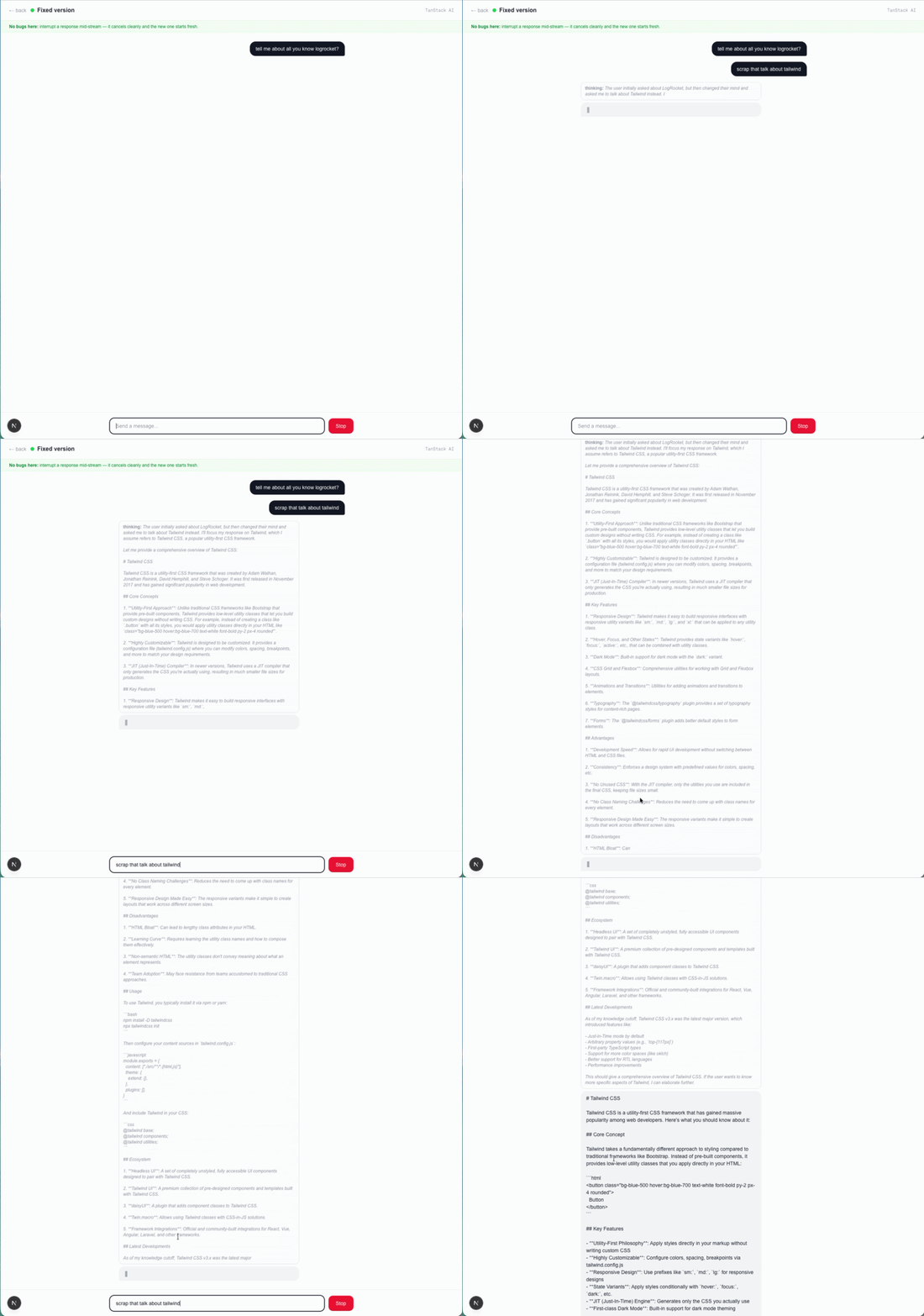
Run the same test again: start a long response, interrupt it mid-thought, and send a second message.
This time, the first request stops cleanly. The second request starts in a fresh slot. There is no flicker, no torn text, and no content leaking from one answer into another.
If you only keep one rule from this article, make it this one: data that pushes itself at you should not be owned by component state alone.
React is excellent at rendering a snapshot of state. It is not, by itself, a transport layer, cancellation system, or concurrency coordinator for external producers.
That is why the same pattern shows up outside AI chat too:
| Data source | What pushes updates | Better home for the stream/state |
|---|---|---|
| AI streaming response | LLM tokens over SSE | External chat store or streaming client |
| WebSocket chat | Server messages | External store |
| Collaborative cursors | Other users’ movement | External store |
| Worker progress | Background thread messages | External store |
| BroadcastChannel sync | Other browser tabs | External store |
The exact implementation can vary. You might use TanStack AI, a custom store plus useSyncExternalStore, or another library built around streamed state. The important part is that React subscribes to the stream owner instead of trying to be the stream owner.
useEffect still has an important job in React. It is the right tool when a render needs to synchronize with something outside the component, such as a DOM listener, a timer, or a one-off subscription.
It is the wrong mental model for AI streaming responses that arrive on their own schedule, can overlap, and need explicit cancellation and request ownership.
That is why the broken demo fails in such a specific way. The code is not obviously wrong. It is built on the wrong boundary. The component is trying to manage a transport problem as if it were just another render-side effect.
Once you move the stream outside React, the behavior becomes much easier to reason about. Cancellation belongs to the stream owner. Message routing belongs to the stream owner. React goes back to doing what it does best: rendering the latest stable snapshot.
So the next time you are wiring up an LLM chat, a WebSocket feed, or any other push-based source, ask one question first: who owns the stream?
If the answer is “the component,” that is usually the first sign you need a store.
Compare React ViewTransition and Motion across four animation patterns. The native build saved ~38.6kB of gzipped JS, but required 179 more lines of CSS.
Learn how to run Cline locally with Ollama to build a secure, private AI coding agent that keeps your proprietary code off cloud servers.

Compare TanStack Charts, Recharts, and Chart.js by building the same React dashboard three times. See how each library’s mental model affects your code.

Is the Rust React Compiler’s 10x speed claim real? We put Babel, Vite (Oxc), and Bun to the test on a real app to find out where the speed actually matters.
Hey there, want to help make our blog better?
Join LogRocket’s Content Advisory Board. You’ll help inform the type of content we create and get access to exclusive meetups, social accreditation, and swag.
Sign up now





